
5 Fleet API Integration Guides for Van Tracking
Five van telematics integration patterns—security, jobs, ERP/CRM, payroll and incidents—with webhook vs polling, ID/timestamp and GDPR guidance.
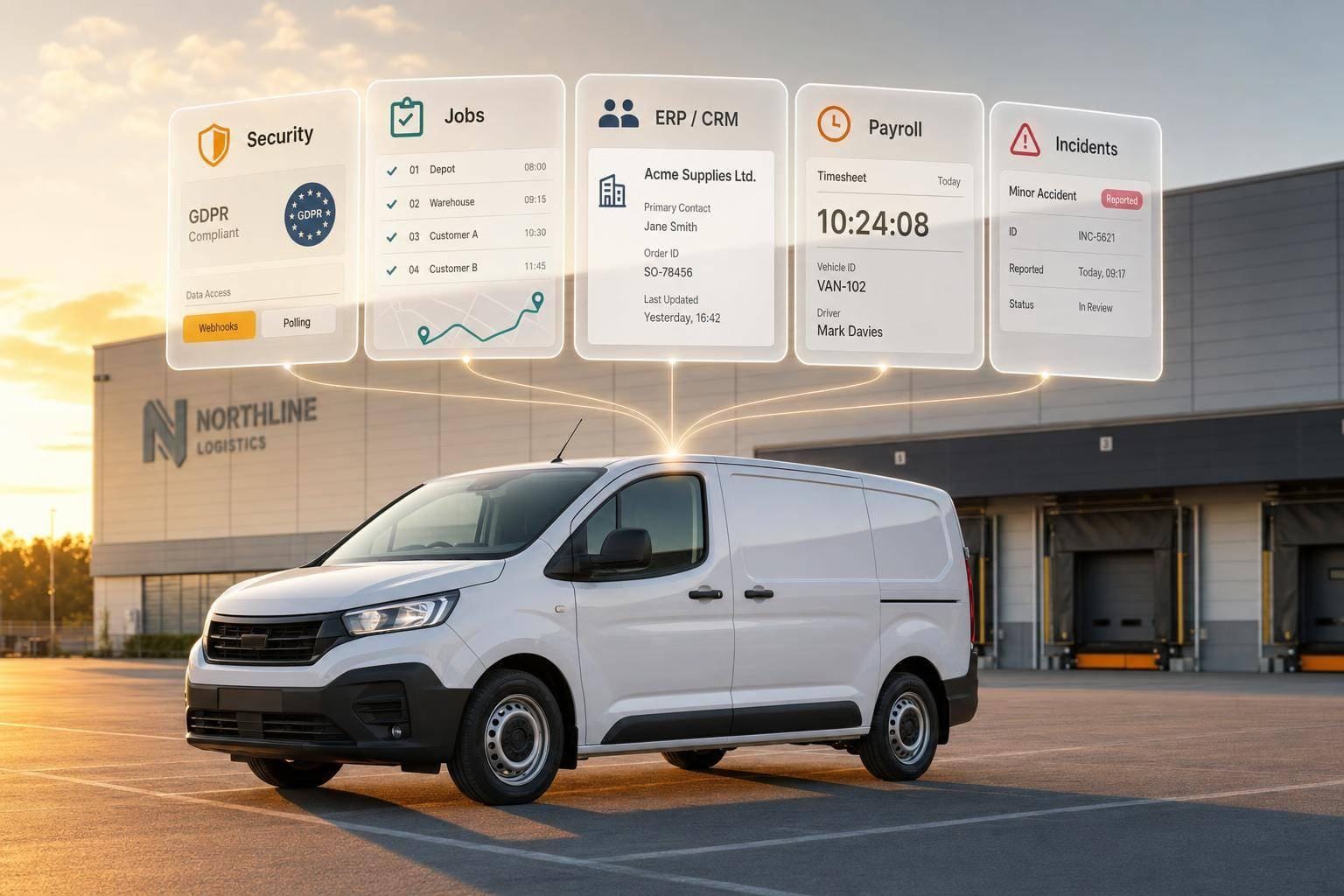
If I had to boil this down to one point, it’s this: pick the integration that matches the business problem first, then choose webhooks or polling based on how fast the data needs to move.
From this article, I’d take away five clear routes:
- Security and fleet visibility for live location, tamper alerts, and theft response
- Job management for ETAs, dispatch, and proof of attendance
- ERP or CRM feeds for customer updates and cost records
- Payroll and compliance for timesheets, mileage, and Working Time checks
- Incident tools for theft, tamper, and movement alerts
A few points matter across all five:
- Use UTC timestamps like
2026-08-11T14:35:00Z, then show them in Europe/London - Keep one main vehicle key, then store VRM, VIN, and fleet ID with it
- Plan for rate limits,
429responses, pagination, retries, and duplicate events - Treat driver-linked location data as personal data under UK GDPR
- Use webhooks for live events and polling for reports, backfills, and scheduled exports
The article also makes the split clear:
- If you need action in seconds, use webhooks
- If you need clean scheduled exports for payroll, finance, or reports, use polling
- If you need both, use a mixed model
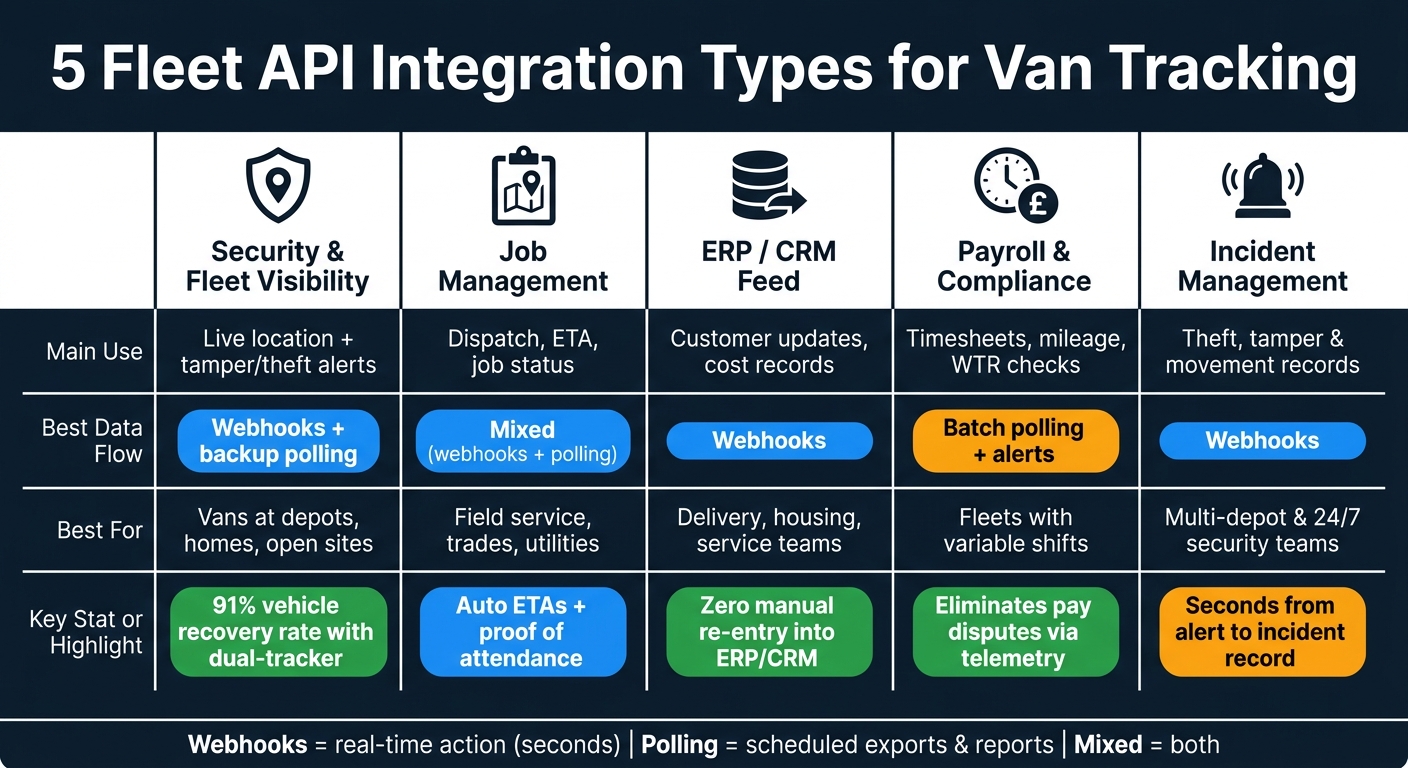
5 Fleet API Integration Types: Use Cases, Data Flow & Best Fit
How to get started with live connected car data using Postman?
sbb-itb-499a7f0
Quick Comparison
| Guide | Main use | Best data flow | Best for |
|---|---|---|---|
| GRS security and fleet visibility | Location + security alerts | Webhooks + backup polling | Vans parked at depots, homes, or open sites |
| REST API to job management | Dispatch, ETA, job status | Mixed | Field service, trades, utilities |
| Webhook feed to ERP or CRM | Customer updates, job/account records | Webhooks | Delivery, housing, service teams |
| API to payroll and compliance | Hours, mileage, WTR checks | Batch polling + alerts | Fleets with variable shifts |
| Security events to incident tools | Theft and tamper records | Webhooks | Multi-depot fleets and 24/7 security teams |
One stat stands out: the article links dual-tracker theft workflows with a 91% recovery rate. That tells me security APIs are not just about maps on a screen. They can shape response time, claims records, and out-of-hours fleet control.
So if I were choosing where to start, I’d keep it simple:
- Late jobs and poor ETAs? Start with job management
- Pay disputes or mileage issues? Start with payroll and compliance
- Theft risk or out-of-hours movement? Start with security + incident tools
That’s the core of the article in plain English: same tracking data, five different outcomes, and the right setup depends on what you need the data to do.
What These Integrations Need to Handle
Every van tracking API integration has to deal with the same core problems: identifiers, timestamps, limits, privacy, and event delivery. These are the common integration problems that tend to break once a setup goes live.
Identifier mapping usually causes the first headache. A van often has three identifiers: registration, VIN, and an internal fleet ID. The safest approach is to use an internal UUID or fleet ID as the main key, then store registration and VIN as unique fields alongside it. API payloads should include all three. That way, downstream systems can still match the right vehicle if a number plate changes after re-registration.
Timestamps need careful handling, especially in the UK, where BST moves the clock forward each March and back each October. Store every event time in UTC using ISO 8601 with Z - for example 2026-08-11T14:35:00Z - and only convert to Europe/London for display and reporting. If you get this wrong, you can end up with one-hour errors in Working Time Regulations records and payroll exports.
Rate limits, pagination, and retry logic are not optional in a production setup. Fleet APIs often cap requests at about 1,000 per minute and return 429 Too Many Requests when you hit that ceiling. Large history queries are often paginated at 100 records per page, so the integration needs to follow next links or cursors instead of assuming one request returns the whole dataset.
A solid setup should include:
- Pagination for large result sets
- Exponential backoff with jitter for throttled requests
- Idempotent batch jobs so retries don't create duplicates
That last point matters more than it seems. Retries happen. If batch jobs aren't idempotent, duplicate records can pile up fast.
Under UK GDPR and fleet telematics, driver-linked van data means location and journey records count as personal data. You need a lawful basis, a clear purpose, and a set retention period. Keep identifiable trip data for 6–24 months, then delete it or anonymise it. Those rules shape the five integration patterns below.
For event delivery, use polling for scheduled syncs and webhooks for time-sensitive events such as geofence breaches, ignition triggers, and security alerts. That's the split the guides below are built around.
1. GRS Fleet Telematics Security and Operations API Guide
GRS Fleet Telematics is a good fit for van fleets that need live visibility and security alerts in one feed. Its dual-tracker setup can show up as a single vehicle record, which helps if one device drops out or fails. The main job here is simple: keep operational events and security events tied to the same vehicle record across dispatch, incident response, and reporting tools.
Core Data Fields Mapped
Start by mapping these fields: vehicle_id, registration, device_id, timestamp, latitude, longitude, speed, heading, ignition_status, power_status, geofence_id, event_type, driver_id, and alarm_status.
Put identifiers first. Then layer in live telemetry and security status. It also makes sense to include tamper alerts, movement alerts, immobilisation or recovery status, last known location, and device health metrics. That way, operations, security, and dispatch are all looking at the same vehicle record instead of piecing things together from separate systems.
| Data Category | Key Fields | Business Use |
|---|---|---|
| Live Tracking | Latitude, longitude, ignition status | Dispatch visibility, customer ETAs |
| Trips | Start time, end time, stop duration, mileage | Proof of attendance, payroll verification, utilisation reporting |
| Driving Events | Speeding, harsh braking, rapid acceleration, cornering | Coaching, risk management |
| Geofencing | Entry/exit timestamps, dwell time | Depot monitoring, automated arrival alerts |
| Security | Tamper alerts, movement alerts, alarm status, recovery status | Incident management, theft response |
| Health | Battery/power status, device health, tracker source | Uptime checks, tamper detection |
Authentication and Access Control
Use role-based access control so each team only sees what it needs. Operations staff may need live location data and journey history. Incident responders, on the other hand, may only need read-only access to security events.
Keep secrets in a vault, rotate tokens on a regular schedule, and use separate credentials for development, staging, and production. If the platform supports it, turn on IP allowlisting too. It’s basic housekeeping, but it stops a lot of pain later.
Webhook or Polling Model
Because this guide leans heavily on security use cases, event delivery matters more than batch sync. A hybrid model usually works best.
Use webhooks for real-time events such as:
- tamper alerts
- theft alerts
- geofence exits
- unscheduled ignition events
Then poll every 5 to 15 minutes for sync checks and device health polling. Also, validate webhook signatures, set up idempotency keys, and de-duplicate retries. Otherwise, one incident can snowball into multiple tickets, and that’s the sort of mess no one wants during a live response.
Best Fit for UK Fleet Use
For UK teams, this setup matters most when vans are left overnight and response time is tight. It suits trades, field services, delivery operators, and other small to mid-sized UK van fleets that keep vehicles at depots, home addresses, or unsecured sites after hours.
In practice, that means security events can flow into dispatch, ticketing, or incident tools without forcing teams to change the way they already work.
2. REST Van Tracking API to Job Management Software Guide
Security alerts help incident teams act fast. In the same way, live van data helps dispatchers, schedulers, and customer service teams keep work moving.
Job management software needs live vehicle data to plan jobs, send crews out, and give customers updates that are actually accurate. Telematics APIs integrate with fleet software to send location, ignition status, ETA, job start and finish times, and mileage into the job system. That means planners can see if the nearest suitable van is free, assign work faster, and cut down on manual status chasing.
Core Data Fields Mapped
Map vehicle_id, driver_id, latitude, longitude, timestamp, speed, ignition_status, journey_status, stop_duration, odometer_reading, estimated_arrival_time, and geofence_entry_exit to job_id, customer_address, scheduled_arrival_window, job_status, assigned_driver, and completion_time.
It also helps to add time_on_site, route_distance, and proof of attendance fields for invoicing and service-level reporting. That extra layer matters. If a customer says, “Your engineer never turned up,” the system has a clear record of arrival, time on site, and departure.
Authentication and Access Control
OAuth 2.0 is usually the better fit when the job management system needs delegated access that can be revoked later. If the setup is a simpler server-to-server link, API keys or bearer tokens over HTTPS are often enough.
Keep access tight. The job system should only read the vehicle data it needs, nothing more. Write access should stay limited to dispatch teams updating jobs, while the tracking feed remains read-only. That split keeps things tidy and cuts the risk of data being changed by the wrong system.
Webhook or Polling Model
A hybrid model tends to work best.
Use webhooks for time-sensitive events such as arrival, departure, job started, job completed, late arrival, route deviation, and ignition changes. Those events can trigger status updates in the job system straight away, with no manual input from the driver or dispatcher.
Polling every few minutes then acts as a back-up for missed events and weak-signal gaps. Put simply: polling checks, but webhooks should run the live status flow.
Best Fit for UK Fleet Use
This setup works well for UK service fleets, including plumbing, electrical, HVAC, facilities, utilities, and field engineering, where live arrival status and proof of attendance feed both scheduling and invoicing.
The upside is pretty clear:
- Faster job allocation
- Fewer missed appointments
- Better evidence of attendance for invoicing
For planners, that means live visibility into what each van is doing without asking drivers to stop and log updates by hand.
3. Webhook GPS Feed to ERP or CRM Guide
Building on the live-event setup above, this model sends tracking data straight into finance and customer records. A webhook GPS feed pushes van events into ERP or CRM the moment they happen - ignition on or off, geofence entry or exit, trip completion - so ERP and CRM teams get status updates straight away, without manual re-entry.
When an event fires, it’s posted to a registered endpoint, checked, and matched to the right job, account, ticket, or asset.
Core Data Fields Mapped
The webhook payload includes vehicle ID, VRM, driver ID, latitude, longitude, timestamp, speed, heading, ignition state, odometer reading, trip start and end events, and geofence entry/exit events. ERP systems use this for cost allocation. CRM systems use it for live ETA, arrival confirmation, and proof of visit.
| Data Category | Fields | Use |
|---|---|---|
| Identity | Vehicle ID, VRM, Driver ID | Link data to asset and personnel records |
| Location | Latitude, longitude, speed, heading | Live mapping, ETA, route deviation |
| Site Events | Geofence entry/exit, dwell time | Proof of visit, job status automation |
| Trip Data | Trip start and end, odometer, distance | Mileage claims, cost allocation, utilisation |
| Status | Ignition state, journey status | Scheduling visibility, job progress |
Authentication and Access Control
Once the payload is mapped, tighten control over who can receive it. Use HMAC signatures to check each delivery against a shared secret. That helps guard against tampering and replay attacks. If the setup is simpler and server-to-server, an API key in a custom header over HTTPS is a practical option.
It also helps to keep payloads limited to the fields the receiving system needs. On top of that, allowlist the endpoint to known IP ranges from the telematics provider.
Webhook or Polling Model
Use webhooks for arrivals, departures, geofence events, and trip completion. Use polling for summaries and backfills. This mixed model keeps key workflows near real time, from the telematics event through to the ERP or CRM record.
For setup, handle it in a simple sequence:
- validate signatures first
- place the event onto an internal queue
- acknowledge at once with a
200 OK - process it asynchronously
That flow helps avoid timeouts and duplicate processing when the platform retries a delivery.
Best Fit for UK Fleet Use
This setup works well for UK fleets in parcel delivery, utilities, facilities management, and housing associations. Geofence entries can update job or case records on their own, which cuts manual checks.
4. Van Tracking API to Payroll and Compliance Systems Guide
This setup sends van tracking data into payroll and compliance systems. Telematics events - ignition on, trip start, geofence entry at a customer site, trip end, ignition off - are turned into timesheet entries by a rules engine that applies pay policies such as contracted hours, overtime thresholds, and travel time rules. That means fewer arguments over hours worked, because both sides can check the same telemetry record. At this point, the event feed moves beyond day-to-day fleet use and into pay and compliance.
Core Data Fields Mapped
The key fields here tie together driver, time, location, and duration. Driver ID and vehicle ID/VRM connect each event to the right employee and vehicle record. Timestamped ignition on/off events set the start and end of paid time. Geofence entry and exit at depots, customer sites, or home bases help separate travel time from on-site working time.
| Data Category | Fields | Payroll/Compliance Use |
|---|---|---|
| Identity | Driver ID, Vehicle ID/VRM | Link events to employee and asset records |
| Time | Ignition on/off, trip start/end, timestamps | Timesheet generation, shift duration, overtime flags |
| Location | GPS coordinates, geofence entry/exit | Travel vs. on-site time, proof of attendance |
| Mileage | Odometer, trip distance, route log | HMRC mileage claims, benefit-in-kind assessment |
| Compliance | Speed events, rest breaks, long continuous driving periods | Duty-of-care logs, Working Time Regulations monitoring, audit trails |
Export payroll times in Europe/London so they match local pay periods. It sounds like a small detail, but it saves a lot of mess at the end of the week or month.
Authentication and Access Control
OAuth 2.0 with client credentials is a good default. It uses short-lived tokens and refresh methods instead of long-lived API keys. If you need a simpler setup, scoped API keys over HTTPS can still do the job, but you should rotate those keys on a set schedule.
Role-based access control (RBAC) matters here. Service accounts should only reach payroll and compliance fields, not raw location traces. HR and payroll teams should see processed timesheet data, not live van positions. API calls should also be logged so there's a clear audit trail if someone needs to check who accessed what and when.
Webhook or Polling Model
The same event feed can serve two different jobs. For compliance, speed matters more, so webhooks are the better fit for Working Time Regulations and break alerts. For payroll, batch export usually makes more sense.
A scheduled nightly or weekly pull of hours, mileage, and compliance summaries keeps the data lined up with pay cycles. In plain terms: use alerts when something needs action now, and use polling when the goal is clean payroll processing.
Best Fit for UK Fleet Use
This setup works well for trades, utilities, field services, and delivery fleets where drivers work variable hours away from a fixed site. It’s especially useful when pay rules get messy - shift allowances, night rates, overtime, and travel time rules all need to be handled the right way. The rules engine takes that load and applies those policies automatically.
Fleets already using telematics for security often have a head start, because they can extend the same data feed into payroll and compliance instead of building from scratch. For that to work, the API needs to expose driver IDs, trip segments, and historical logs.
5. Security Event API to Incident Management Tools Guide
This setup turns the same security telemetry into an incident record with a response workflow. In plain terms, theft, tamper and unauthorised-movement alerts are pushed straight into incident management tools so teams can act at once. The big win is simple: less time between detection and escalation.
Core Data Fields Mapped
To create and route an incident without manual work, you need enough identity, event and location data up front. That includes vehicle registration, VIN, driver ID, depot or regional team, and a timestamp in ISO 8601 format with UK time zone handling.
The event data also needs to be clear enough for the system to act on it. That means the event type - such as theft, tamper, geofence breach or forced entry - plus severity level, GPS coordinates, ignition state, speed, heading and immobiliser status. For dual-tracker vans, include the active tracker and the last-contact time as well.
| Field Category | Key Fields | Incident Management Use |
|---|---|---|
| Asset identity | Vehicle ID, registration plate, VIN, make/model | Match to fleet and insurance records |
| Driver and depot | Driver ID, depot or regional team | Route incident to the correct regional team |
| Event detail | Event type, severity, alarm type, tamper status | Set priority and trigger the correct workflow |
| Location | GPS lat/long, speed, heading, geofence ID | Share with police and track movement in real time |
| Security state | Ignition state, immobiliser status, battery disconnect | Distinguish false alarms from confirmed threats |
| Tracker status | Device ID, active tracker, last-contact time | Confirm data reliability during active theft |
Authentication and Access Control
Once those fields are mapped, the next step is to lock down who can send and view them. Use signed API keys, OAuth 2.0 client credentials or mutual TLS, and verify webhook payloads with an HMAC signature. Each payload should be signed with a shared secret and checked before processing. All traffic should run over HTTPS with TLS 1.2 or above.
Keep the integration service account tightly limited. It should only be able to post security events, nothing more. If the incident platform allows it, IP allowlisting adds another check.
Because this flow includes driver IDs and exact location data, UK GDPR applies. Data processing agreements need to be in place with both the telematics provider and the incident management vendor. Inside the incident tool, role-based access should limit detailed location and driver links to authorised security and management staff only.
Webhook or Polling Model
For security events, webhooks are the right fit. Polling is simply too slow when something is happening live.
The telematics platform should send an HTTP POST the moment an event fires, and the incident tool should acknowledge receipt with a 200 response. If delivery fails, retry using exponential backoff within a fixed maximum window.
To stop duplicate incidents, every event should include a unique event_id. The incident tool should also treat its ingestion endpoint as idempotent. So if the same event_id arrives twice, it updates the existing incident instead of creating a second one. Queueing alerts at source and batch-processing them downstream also helps avoid dropped events when volumes spike.
Best Fit for UK Fleet Use
This approach works well for medium to large fleets, multi-depot operations and 24/7 security teams that need auditable incident records. It also suits fleets working under formal security frameworks such as FORS Gold, ISO 27001 or customer SLAs, where documented incident records are a hard requirement, not just a nice extra.
GRS Fleet Telematics dual-tracker technology fits neatly into this model. It supports a 91% recovery rate for stolen vehicles, and the incident record can log which tracker is active and what actions have already been taken. That gives recovery teams and claims handlers a clear timeline from the moment the alert is triggered.
Use the comparison tables below to weigh alert speed, routing depth and audit needs.
Comparison Tables to Support the Guides
The five guides above use the same core data in different ways. The tables below give you the fastest way to compare them side by side.
Field Mapping: Tracking Data to Destination Systems
The table below shows how the same raw telematics fields can mean different things depending on where the data ends up. Fields marked Critical are required for that integration to work properly. Useful means the field adds extra value but isn't mandatory. Not used means that destination system will usually ignore it.
| Tracking API Field | Security & Operations | Job Management | ERP / CRM | Payroll & Compliance | Incident Management |
|---|---|---|---|---|---|
| Vehicle ID / Registration | Critical – theft alerts, immobilisation | Critical – match job to vehicle | Critical – link to customer or job record | Critical – support mileage and trip records | Critical – match to fleet and insurance records |
| Driver ID / fob ID | Critical – confirm unauthorised movement | Critical – assign job to driver | Useful – link to driver or account history | Critical – attribute hours and mileage to driver | Critical – link to the correct driver/vehicle record |
| GPS coordinates (start/end) | Critical – locate vehicle, define geofences | Critical – confirm arrival, proof of visit | Useful – log site visits in CRM | Critical – populate HMRC mileage origin and destination | Critical – share location and track live movement |
| Timestamp (ISO 8601, Europe/London) | Critical – sequence events and response | Critical – auto-complete job arrival/departure | Useful – record visit time | Critical – determine shift start/end, total hours | Critical – build incident timeline |
| Trip distance (miles) | Useful – utilisation reporting | Useful – route efficiency | Useful – cost allocation | Critical – total business mileage for HMRC log | Useful – support insurance claims |
| Ignition on/off | Critical – out-of-hours movement alert | Critical – mark job start and end | Not used | Critical – define working periods versus breaks | Critical – distinguish false alarm from confirmed threat |
| Geofence breach event | Critical – depot exit, unauthorised area | Useful – confirm driver is on route | Useful – flag off-contract travel | Useful – flag journeys outside approved regions | Critical – trigger incident workflow |
| Speed / harsh event | Useful – risk profiling | Useful – driver coaching | Not used | Useful – driver behaviour log | Critical – support collision or near-miss record |
| Immobiliser status | Critical – confirm vehicle secured | Not used | Not used | Not used | Critical – log actions taken during theft |
Once the field map is set, the next job is working out which events should trigger which actions.
Webhook Events to Business Actions
Different webhook events should lead to very different downstream actions. This table maps common events to the action each integration should take when it receives them.
| Webhook Event | Security Response | Operations / Dispatch | Payroll & Compliance | Incident Management |
|---|---|---|---|---|
ignition.on |
Check against schedule; flag if out of hours | Job started; ETA tracking begins | Start shift timer; log location | Log event with timestamp |
ignition.off |
Confirm vehicle at approved location | Job complete | End shift timer; calculate hours | Close active monitoring window |
geofence.exit |
Alert if outside approved hours or area | Notify dispatcher of depot departure | Flag if outside contracted work zone | Trigger review if unscheduled |
trip.ended |
Confirm vehicle returned to compound | Auto-complete job | Generate HMRC mileage entry (date, origin, destination, miles, purpose) | Archive trip record for audit |
unauthorised.movement |
Immediate alert; begin immobilisation workflow | Notify fleet manager | Flag outside scheduled hours; exclude from standard mileage | Create incident record; log active tracker |
harsh_brake / speeding |
Flag for driver review | Flag for driver coaching | Add to driver behaviour log | Include in collision or near-miss report |
tamper / tracker.offline |
Escalate to recovery team immediately | Alert operations to check vehicle status | No direct payroll action | Open incident; log device ID and last-contact time |
Timing affects more than response speed. It also shapes the reports each system can produce.
Sync Frequency by Use Case
Choose the wrong sync model and you'll either burn through API budget or slow down theft response. The guidance below reflects how time-sensitive each use case is.
| Use Case | Recommended Model | Suggested Interval | Impact of Delay |
|---|---|---|---|
| Theft and security monitoring | Webhook | Real time (seconds) | Even short delays can hinder recovery |
| Live job dispatch and ETA | Webhook or fast poll | 15–60 seconds | Inaccurate ETAs frustrate customers and dispatchers |
| Customer service / CRM updates | Webhook or poll | 5 minutes | Minor; tolerable for most customer service workflows |
| Payroll and timesheets | Batch poll | End of shift or daily | Low impact; data is aggregated anyway |
| HMRC mileage logs | Batch poll | End of trip or daily | Low impact; logs only need to be accurate, not instant |
| Incident and compliance logs | Webhook | Real time (seconds) | Delayed records weaken audit trails and insurance claims |
UK Compliance Outputs by Integration
| Compliance Output | Primary Integration | Key Fields Required | Notes |
|---|---|---|---|
| HMRC mileage log | Payroll & Compliance | Date, origin, destination, miles, journey purpose, driver ID | Classify each trip as business or private; retain for 5 years |
| Driver timesheet | Payroll & Compliance | Ignition on/off, driver ID, shift start/end, break periods | Align timestamps to Europe/London time zone, including BST |
| Working Time Regulations summary | Payroll & Compliance | Total driving hours, rest periods, daily/weekly limits | |
| Security incident record | Incident Management | Event type, timestamp, GPS, vehicle ID, driver ID, immobiliser status, tracker ID | Log which tracker is active; include actions taken and by whom |
| Driver behaviour log | Job Management / ERP | Speeding events, harsh braking, idle time, trip distance | Supports insurance reviews and driver coaching programmes |
| Proof of service / site visit | Job Management | GPS coordinates, arrival/departure timestamp, job reference | Useful for customer disputes and contract compliance |
Before go-live, verify HMRC mileage fields with finance. Also treat security event streams as sensitive personal data under UK GDPR, with role-based access controls.
Implementation Tips for UK Fleet Teams
Before you build any of the five integrations, get clear on who owns what. Operations, finance, HR and security may all pull from the same telematics feed, but that doesn’t mean they should all edit the same fields. Give each data field a named owner, decide which system is allowed to change it, and agree an escalation path before go-live. That upfront work avoids the usual mess later, when two teams think their version is the “right” one.
To move from design into production, keep the rollout tight and controlled. Start in a sandbox environment and test with realistic but anonymised vehicle and driver data. When that’s working as expected, run a small pilot with a limited set of vans, ideally spread across different depots and duty patterns. That matters even more when the integration touches payroll or compliance, because a bad sync here doesn’t just create admin work - it can affect pay and legal records.
After the pilot settles down, lock in your timestamp and delivery rules before you roll it out across the full fleet. Store event times in UTC, show them in Europe/London, and stick to one distance unit in middleware so every downstream system reads the same values.
For webhook security, don’t leave gaps. Validate signatures on every incoming payload. Reject events based on the event timestamp. Store processed event IDs so replayed requests get blocked. Rotate signing secrets every 60–90 days, with a short overlap window before you revoke the old one. And keep secrets in a key vault, not in source code or config files.
It also helps to bake UK-specific rules straight into the integration layer. Use postcode-based geofences for ULEZ and CAZ compliance checks. Link depot-based mileage rules to vehicle IDs so payroll and finance apply the right thresholds every time. And use 24-hour time for all job windows across payroll, compliance, security and dispatch, so there’s no room for mix-ups between teams or systems.
Conclusion
Use the table below to choose your first integration based on the business goal that matters most right now.
| Primary goal | Start with |
|---|---|
| Dispatch visibility and routing | REST Van Tracking API to Job Management Software Guide; add the Webhook GPS Feed to ERP or CRM Guide if you need live ETA updates |
| Customer ETAs and delivery updates | Webhook GPS Feed to ERP or CRM Guide |
| Payroll accuracy and timesheets | Van Tracking API to Payroll and Compliance Systems Guide |
| Compliance evidence and audit trails | Van Tracking API to Payroll and Compliance Systems Guide |
| Theft response and security alerts | GRS Fleet Telematics Security and Operations API Guide + Security Event API to Incident Management Tools Guide |
Choose one primary outcome first, then set one KPI to match it. That keeps the project focused. Van tracking data only starts to pull its weight when it maps to a single business result, whether that's cutting payroll disputes, reducing late deliveries, or shrinking the gap between a theft alert and a response.
Once you've picked the first use case, line up the integration model with your systems and latency needs. If you need alerts the moment something happens, use webhooks. If your process runs on a schedule, polling is often the simpler option and uses fewer API calls.
Keep personal data to a minimum and make sure output formats fit UK reporting. For fleets with a strong security focus, GRS Fleet Telematics is the natural place to begin for Guide 1. Its security and operations API maps straight to high-frequency security events, remote immobilisation controls, and incident workflows.
It also helps to get operations, IT, and finance or compliance in the room for the first pilot. That way, the KPI, data fields, and audit needs are agreed from the start. Run a short pilot with one depot or van group before a full rollout. Start small, prove the workflow, then expand.
FAQs
How do I choose between webhooks and polling?
Choose based on how fast you need the data and how lean you want your system to be.
Polling means asking the API for data at set intervals. It’s simpler to set up, which is handy when you want something straightforward. The trade-off is that frequent requests can use more resources.
Webhooks work differently. They send data to you automatically when an event happens, so they’re usually more efficient.
If you need real-time alerts or live updates, use webhooks. If the data doesn’t need to arrive straight away, polling may be enough.
What data fields should I map first?
Start with the fields that matter most to your core business goals. That might mean real-time location for fleet visibility or odometer readings for maintenance. First, map your key identifiers - Vehicle ID, Driver ID and Order ID - so data stays consistent across systems.
For technical consistency, standardise timestamps in UTC and store location data in GeoJSON. Then focus on the fields that support your immediate priorities, such as route optimisation or payroll automation.
How should UK fleets handle GDPR and timestamps?
Use UTC for all system timestamps so fuel, GPS, and delivery data stay in sync. Also, log every API interaction, including who accessed the data and when, so you have a clear audit trail.
For GDPR, keep data collection to what’s needed, set clear retention periods, and document a lawful basis for processing. Carry out a DPIA where needed, secure data transfers with TLS 1.2 or higher, and be ready to notify the ICO within 72 hours if a breach happens.