
Fleet IoT Security Breaches: Recovery Guide
Contain fleet IoT breaches: restore dispatch, verify trackers and SIMs, rotate credentials and log evidence for insurers.

A fleet IoT breach can stop dispatch, hide vehicles, expose driver data, and trigger insurer and ICO deadlines within 24–72 hours. If I were dealing with this, I’d focus on four things first: contain access, keep vehicles moving with manual fallback steps, check trackers and SIMs for abuse, and keep a dated evidence log for insurance and data-breach reporting.
In plain terms, this guide shows how to:
- isolate affected systems and cut off bad access
- keep dispatch and driver contact running while systems are down
- restore from clean backups and reconnect vehicles in small batches
- check trackers, firmware, SIM use, and logs to see what was touched
- reset accounts, keys, and device credentials in the right order
- decide which devices to wipe, replace, or retire
- notify insurers fast and assess whether ICO reporting is needed within 72 hours
- turn lessons from the incident into clear tasks for IT, fleet, transport, and compliance
A few points stand out straight away:
- If GPS history, VINs, or IMEIs were exposed, UK GDPR may apply
- If attackers changed tracker settings or moved M2M SIMs, vehicles can show the wrong location or vanish from the map
- If you restore too fast without checks, you can put infected systems or altered devices back into service
- If logs are thin, it becomes much harder to prove what happened, which can slow claims and follow-up work
Here’s the short version: stop the spread, restore the core service, verify every device and SIM, rotate access, and document everything with UK dates and 24-hour times. That’s the simplest path to getting the fleet back on the road without making the incident worse.
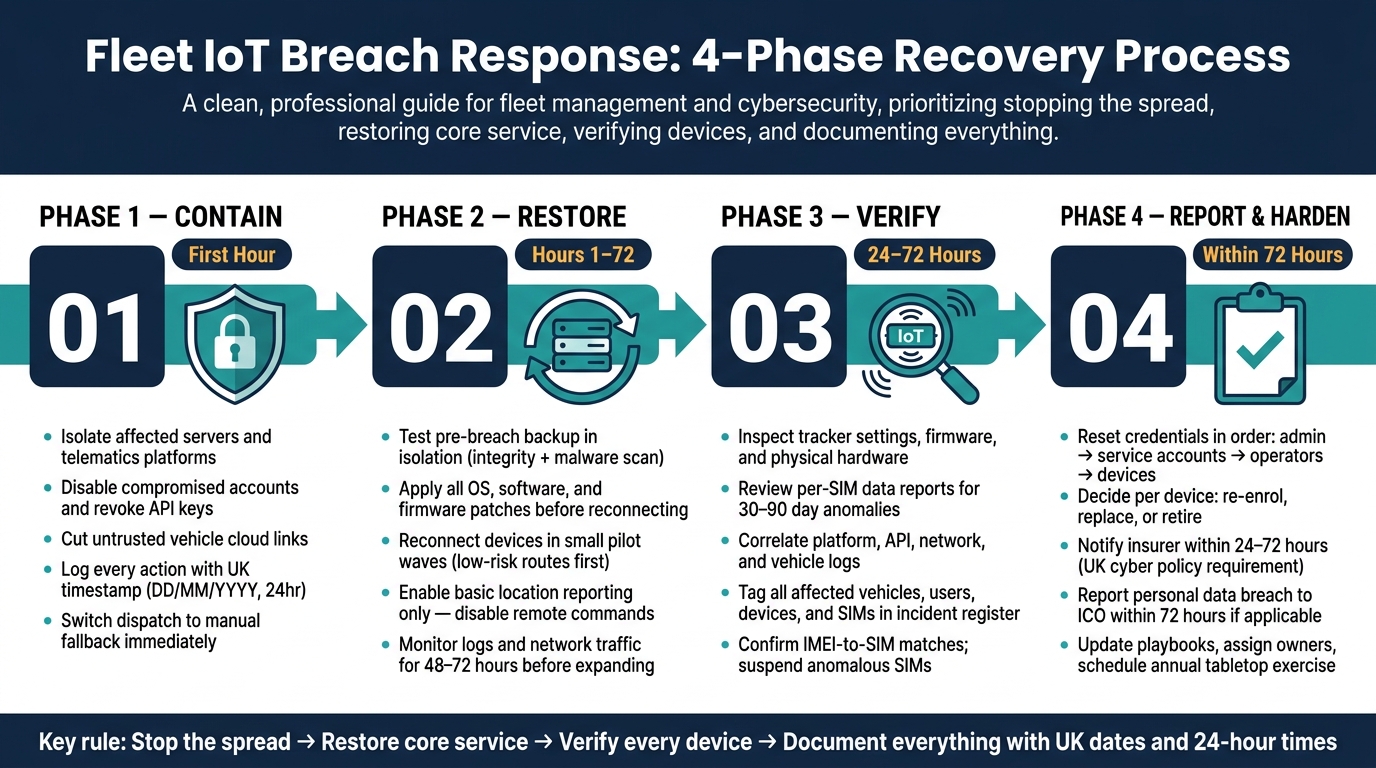
Fleet IoT Breach Response: 4-Phase Recovery Process
Contain the breach and restore critical fleet services safely
In the first hour, isolate affected servers and telematics platforms, disable compromised accounts, revoke API keys or tokens, and cut any untrusted vehicle cloud links. Log every action with a UK-format timestamp - for example, 19/08/2026, 17:45. That record may matter later for insurers and any regulatory follow-up.
Once the breach is contained, bring the fleet back online based on operational risk. Start with the systems that keep vehicles moving and people informed, then work through the rest in a controlled way.
Prioritise dispatch, tracking and driver communications first
Restore dispatch, live tracking and driver communications first. If the portal is down, switch to manual route sheets, one duty phone number, and logged check-ins. For night-time routes or high-value vehicles, ask for SMS check-ins at set times.
Be plain and prompt in every message. Drivers need to know exactly what has changed and what they must do now. Transport teams need a clear view of which depots are using manual procedures and when digital dispatch is due back. Customers need revised delivery windows.
Use 24-hour times and day-month-year dates in all messages - for example, delivery may now be planned between 09:00 and 11:00 on Thursday 20/08/2026. Pre-written message templates help here because they cut confusion when things are moving fast.
Rebuild systems from clean backups and reconnect devices in stages
Do not reconnect devices until the backup has been checked and confirmed clean, and all patches have been applied.
Test the latest pre-breach backup in isolation before using it live. Run integrity and malware scans. Check for unexpected admin accounts, altered certificates, or new services. If anything looks off, treat that backup as compromised and keep it out of production. Offline immutable backups are much harder for attackers to tamper with, which is why they are seen as best practice for fleet management systems.
After you have a verified clean restore, apply all outstanding patches before reconnecting even one vehicle. That includes the operating system, telematics software, and firmware on IoT gateways and trackers.
Then reconnect devices in controlled waves:
- Start with a small pilot group on low-risk routes
- Turn on basic location reporting first
- Leave advanced remote commands, such as remote vehicle immobilisation, switched off at the start
Watch logs and network traffic for that pilot group for at least 48–72 hours. If all is stable, expand by depot, region, or vehicle type. That makes it far easier to trace and contain any repeat issue.
Once core services are stable, review trackers, SIM activity, and audit logs to confirm exactly what the breach affected.
sbb-itb-499a7f0
Check trackers, SIMs and audit logs to confirm what was affected
Once services are stable, the next job is simple: work out exactly which devices, SIMs and accounts were touched before you close the incident.
Inspect tracker settings, firmware and signs of tampering
Check each tracker against its approved baseline. Look at reporting intervals, geofences, immobilisation settings, data endpoints and encryption. If intervals or geofences have changed without approval, that’s a strong sign of tampering.
Firmware matters just as much. Make sure every device is running a vendor-approved, signed firmware version. If a unit shows an unapproved build or an unexpected downgrade, treat it as compromised until you can prove otherwise.
For vehicles marked high risk during the log review, arrange a physical inspection. Technicians should look for loose wiring, non-standard connectors, broken seals or any added hardware - such as a piggyback board - that should not be there. Match the hardware identifiers shown in the platform, including the serial number, IMEI and module ID, against your asset register. That helps confirm that no devices have been swapped.
If you use dual-tracker set-ups, they can help keep location visibility in place while one unit is isolated.
Review M2M SIM activity for anomalies and unauthorised use
Ask for per-SIM reports covering the breach period and the previous 30–90 days. Check for data volume spikes, unusual session times, sustained high throughput that doesn’t fit normal telemetry, and any roaming in countries where your fleet does not operate.
Also confirm that each SIM still matches its assigned IMEI. If a SIM appears on a different device ID, that’s a clear sign it has been moved into unauthorised hardware - a rogue router, a mobile phone or another IoT device. Suspend any anomalous SIMs at once, then apply data caps and roaming limits across the rest.
Use audit logs to trace access, commands and affected vehicles
Correlate platform, API, network and vehicle logs to trace the breach from login to command to vehicle impact. Normalise all timestamps to UK local time before you do this. Then identify your anchor events: the first anomalous login, the first unexpected API call and the first suspicious vehicle command. From each anchor, trace forwards and backwards to map the accounts, keys, IP addresses and vehicles involved.
The table below shows what each log source can tell you and why it matters for recovery and reporting:
| Log source | What it shows | Why it matters |
|---|---|---|
| Platform (console) | User logins, role changes, configuration edits, console-initiated commands | Identifies compromised accounts, improper changes and who did what and when |
| API | Programmatic access, API key usage, endpoints called, request/response details | Highlights abused integrations or keys and scopes malicious automated actions across vehicles |
| Network | IP addresses, geographies, connection times and volumes for telematics traffic | Shows where attacks originated and supports blocking rules and evidence for providers and insurers |
| Vehicle event history | Per-vehicle ignition, movement, alerts, remote actions and status changes | Links digital commands to physical effects on specific vehicles, aiding asset-level triage |
As you work through the logs, tag every affected vehicle, user, device and SIM in an incident register. Note which commands were executed and whether they completed successfully. That register will support insurer reporting, plus the access resets, device decisions and control changes that come next.
Reset credentials, review devices and report to insurers
With the audit logs checked and affected assets mapped out, the next move is simple: shut down access, decide the fate of each device, and log the incident with your insurer. Your incident register should set the order for resets, device decisions and reporting.
Reset passwords, revoke sessions and rotate device credentials
Start by terminating active sessions and revoking tokens. After that, reset credentials in this order: privileged and admin accounts, service accounts and API keys, operator and dispatcher logins, then device credentials on trackers, routers and tablets. That sequence matters. If you reset things in the wrong order, you can end up with lockouts or broken integrations.
For API keys, the safest path is to create the new key, test it, then revoke the old one. It sounds basic, but it stops the sort of outage that happens when the old key is cut off before every system has switched over.
Use the breach as a chance to fix weak access controls that were already there:
| Access area | Pre-breach (weak) | Post-breach (hardened) |
|---|---|---|
| Admin logins | Shared "admin" account, no MFA | Named individual accounts with MFA enforced |
| Dispatcher access | Single login shared across team | Unique accounts per user, RBAC roles applied |
| Remote immobilisation | Available to all operations staff | Restricted to a small approved group with logged approvals |
| API keys | Long-lived keys, rarely rotated | Rotated immediately post-breach; automated rotation scheduled |
| Inactive accounts | Left enabled after staff departure | Automatically disabled; reviewed quarterly |
Decide which devices to re-enrol, replace or retire
Not every device that was online during the breach needs replacing. But every device does need a clear call. The key question is whether it can return to a clean, verified state.
If a device supports a trusted factory reset or re-flashing from a vendor-approved image, it can usually be wiped and re-enrolled, as long as firmware signatures and checksums are checked afterwards. Older units that no longer get security updates are strong candidates for retirement. And if a device shows physical tamper signs, replace it and keep it as evidence. Don’t reconfigure it and send it back out.
Take a stricter line with high-risk vehicles, especially those carrying high-value goods, pharmaceuticals, fuel or hazardous materials. In those cases, if there’s any doubt, replace the device rather than re-enrol it. For fleets using dual trackers, make sure both units are communicating before the vehicle goes back into service.
Before you contact the insurer, log every device decision. Record the device ID, action taken, firmware version checked, test results, and sign-off from both IT and fleet operations in a return-to-service log.
Report the incident to insurers and keep a clear evidence file
Once access is locked down and device decisions are logged, notify the insurer. UK cyber insurance policies often require notice within 24–72 hours of discovering an incident, and missing that window can put cover at risk. Report early and confirm what the policy covers at the same time.
Put together a clear evidence file with:
- the incident timeline
- affected systems and vehicles
- containment actions
- any possible personal-data exposure
- any third-party forensic support involved
If driver location histories, customer delivery addresses or route data were exposed during the breach, you may also be dealing with a UK GDPR issue. Organisations must report notifiable personal data breaches to the Information Commissioner's Office (ICO) within 72 hours of becoming aware of them.
Early, organised reporting gives insurers a cleaner view of the incident, helps move claims along, and can open access to forensic and legal help that many UK cyber policies include as standard. It also shows that the fleet took the breach seriously. A documented chain of actions - sessions revoked, credentials rotated, devices assessed, SIMs deactivated - can make a difference when renewal discussions come around.
Turn the incident into a stronger fleet security plan
Use the evidence from tracker checks, SIM review and audit logs to make the next response tighter and faster. Look at those findings side by side and work out which control gave way first. That matters, because the first failure often tells you where the next fix should start.
Update playbooks, monitoring and ownership across operations and IT
Start with ownership. If everyone owns a task, no one does.
Give each workstream one clear owner:
- Technical containment: IT or Security Lead
- Fleet continuity: Fleet Operations Manager
- Insurer and regulatory contact: Risk or Compliance Manager
- Driver communications: Transport Manager
Each owner should have a short, time-boxed checklist they can use straight away. In a live incident, that kind of clarity saves time and cuts confusion.
Once ownership is clear, update the playbook around what this incident exposed. Use the post-incident review to fix logging gaps, extend log retention to 6–12 months, and switch on detailed device, application and network logging. Then test the revised playbook in practice. Run at least one tabletop exercise each year - a walk-through of a simulated breach with operations and IT in the same room - so you can see whether the process still holds up when things get tense.
Key takeaways for future fleet resilience
Each lesson should become a named control, an owner and a deadline. Don’t leave it as a note in a meeting doc. Turn it into a task that someone must finish.
| Incident lesson | Planned improvement | Responsible owner |
|---|---|---|
| Incomplete device and SIM inventory slowed containment | Live inventory of trackers, SIMs and vehicles, updated at onboarding and offboarding | Fleet Operations Manager |
| Default or shared credentials increased compromise risk | Unique admin accounts with MFA; IoT authentication methods and keys rotated after the incident | IT/Security Lead |
| Thin logging made scope analysis difficult | Detailed device, application and network logs enabled with 6–12-month retention | IT/Security Lead |
| Slow insurer contact complicated claims | Clear insurer trigger thresholds and evidence checklist added to the playbook | Risk/Compliance Manager |
| Drivers lacked clear guidance during outage | Scripted driver communications and offline contingency procedures, including manual job sheets and phone check-ins, maintained as a permanent contingency plan | Transport Manager |
| Patch gaps left devices vulnerable | Scheduled firmware windows with severity-based prioritisation; critical patches applied within 7–14 days | IT/Security Lead |
| SIM anomalies went undetected | Automated alerts for data spikes, unusual roaming and out-of-hours traffic; rapid suspension procedure documented | IT/Security Lead |
Use these controls together, not as stand-alone fixes. A live inventory helps containment. Better logging helps scope. Driver scripts keep the fleet moving when systems are down. Put together, they give you a plan that’s much easier to run when the pressure hits.
FAQs
Who should lead breach recovery?
Breach recovery should be led by trained staff with proper approval, such as fleet managers or named team members, working from a clear, written incident response plan.
If there are legal or safety risks, recovery needs professional oversight. In vehicle theft cases, that also means direct co-ordination with law enforcement. Every action should happen through secure, role-based systems with a clear audit trail.
When should vehicles stay offline?
Vehicles should stay offline during risky firmware or service windows. If you're sending OTA updates, do it only when the vehicle is stationary, the ignition is off, external power is stable, and the signal is strong.
Weak connectivity and a battery that might drop halfway through a download are a bad mix. They can corrupt firmware and make recovery much harder.
A safer approach is to schedule updates overnight, when vehicles are parked, usually between 23:30 and 03:30, or at weekends.
What evidence should we keep?
Keep one central, append-only record of system activity and incident response steps.
That record should include audit logs for high-risk actions, user access, and API activity. It should also include records of firmware and software updates, with asset IDs, versions, and deployment status.
Store OTA update logs in secure off-board storage as well. And make sure the breach, remediation actions, and risk assessments are documented for insurers, regulators, and UK GDPR.