How Fleet Tracking Scales with Fleet Growth
Align onboarding, access, alerts, live maps and reporting so fleet growth adds control — not admin, blind spots or noise.
 By Michael Bar9 min read
If I grow from 5 vans to 500 vehicles, the tracking setup must scale in five areas: onboarding, access, alerts, live maps, and reporting. If any one of those falls behind, I get more admin, more blind spots, more noise, and less control.
Here’s the short version:
- New vehicles need the same install steps, naming rules, and default settings every time.
- New users need role-based access, so each team only sees what it needs.
- Alerts need sorting by risk and route, or teams drown in notifications.
- Live maps need filters and saved views, or large fleets become hard to read.
- Reports need to turn raw tracking data into actions on maintenance, use, and driver issues.
At small scale, I can often patch things together with calls and spreadsheets. At 500 vehicles, that stops working. The article shows how to keep the same controls in place as the fleet grows, while cutting manual work and keeping head office and depots aligned.
A few points stand out:
- Fleets add more than vehicles. They add staff, depots, data, and risk.
- New vans should inherit geofences, alert rules, and report groups from day one.
- One shared system with branch-level permissions gives local teams access without losing central oversight.
- Exception reporting works best when it shows only what needs attention, such as speeding, idling, route deviation, missed arrivals, and geofence breaches.
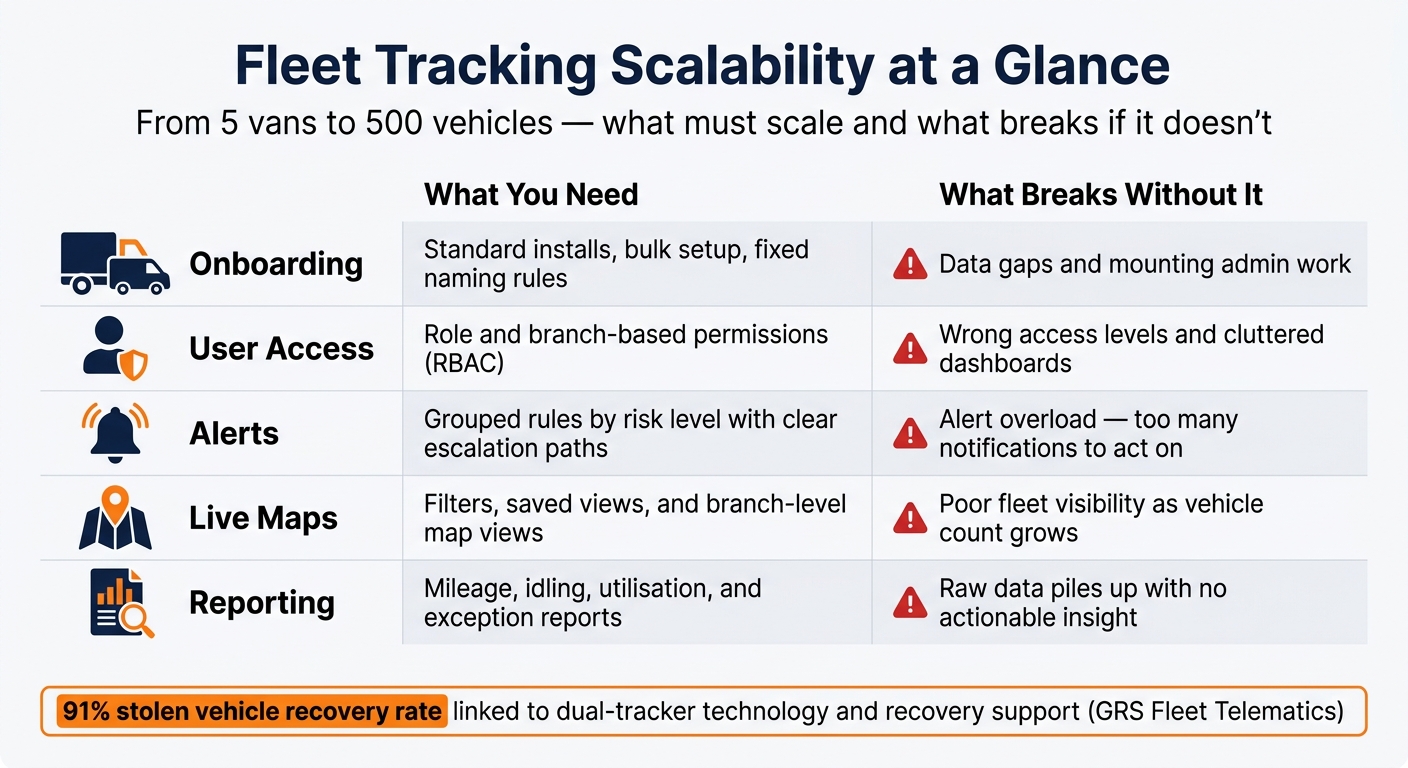
Fleet Tracking Scalability: 5 Key Areas & What Happens Without Them
Quick view
| Area | What I need as the fleet grows | What happens if I don’t |
|---|---|---|
| Onboarding | Standard installs, bulk setup, and fixed naming rules | Gaps in data and more admin |
| User access | Role and branch-based permissions | Wrong access and crowded dashboards |
| Alerts | Grouped rules and clear escalation | Too many alerts to act on |
| Live maps | Filters, saved views, branch views | Poor visibility across the fleet |
| Reporting | Mileage, idling, use, and exception reports | Data piles up with little action |
The core point is simple: fleet tracking scales when the setup stays clear, repeatable, and easy to use as vehicle numbers climb.
Adding Vehicles Without Rebuilding the Setup
Fleet growth often comes in waves. And each wave can pile on install work, admin tasks and new blind spots. When vehicles are added in batches, messy installs, duplicate admin and mismatched records can leave gaps in what the fleet team can see.
Standardising Device Installation and Vehicle Onboarding
The first test is simple: can you add vehicles without piling on extra admin? A setup that scales well uses the same installation method, the same naming convention and the same activation checklist every time. Bulk registration and template settings help keep each new vehicle on the same profile, so admins aren’t stuck doing the same manual setup again and again for every vehicle.
Each vehicle should be logged with the same details:
- registration or asset ID
- depot
- tracker serial number
- installation date
Using the same install process cuts the risk of weak signal strength, inaccurate journey records and false fault alerts. It also makes staged onboarding much easier when vehicles are added over time.
Keeping New Vehicles Aligned With Existing Rules
Putting a new van on the live map is only one part of the job. It also needs to pick up the rules already used across the fleet - geofences, alert thresholds, maintenance reminders and reporting groups.
If that doesn’t happen by default, new vehicles can miss alerts, sit outside geofences and get left out of scheduled reports. Every new asset should be placed in the right fleet group and linked to the right report set before it goes live. That keeps visibility steady as the fleet grows.
Once onboarding is standardised, the next pressure point is user access across teams and branches.
Scaling User Access Across Teams, Depots and Branches
As fleets get bigger, more people need access to tracking data. If everyone gets the same permissions, things go wrong fast: more mistakes, more privacy risk, and dashboards packed with stuff people don't need. Role-based access control (RBAC) fixes that by showing each user only the data and tools tied to their job.
Using Role-Based Access for Admins, Dispatchers and Managers
Set access by job role, not by how many vehicles are in the fleet. An admin needs control over vehicles, users, alerts and settings. A dispatcher needs live visibility of assigned vehicles and day-to-day work. A manager needs reports and exception data. Finance and HR teams may only need read-only access to mileage, timesheets and fuel use. They don't need open access to system-wide settings or geofence controls.
Here’s how permissions often break down across common fleet roles:
| Role | Vehicle Visibility | Alert Management | Report Exports | User Management |
|---|---|---|---|---|
| Admin (Head Office) | Full fleet | Full control | All reports, fleet-wide | Full control |
| Depot Manager | Branch or region | Limited, local alerts | Full or scheduled | No |
| Dispatcher | Assigned fleet or branch | Operational alerts | Basic | No |
| Finance / HR | Read-only | None | View/export depending on policy | No |
The same model can be used across branches. This scalability is often influenced by whether you choose pay-as-you-go or contract fleet tracking models. That cuts down on mistakes and makes audits easier.
Giving Each Branch Access to Its Own Fleet Without Losing Head Office Oversight
When work spreads across several depots, branch-based permissions stop being a nice extra and start becoming a must. A depot manager should be able to see their own vehicles, deal with local alerts and assign local drivers, without seeing data from other sites. At the same time, Head Office still needs to compare sites from one dashboard.
The best setup usually comes from one central database with filters and permission rules, not separate systems for each branch. Local teams get direct access to the data they use every day. Central management keeps fleet-wide reporting and control in one place.
That balance matters. Local teams can get on with the job, while Head Office keeps a clear view across the whole operation.
Once access is split up properly, the next pressure point is usually alert volume and live-map performance.
Handling Alerts, Live Maps and Data Flow as the Fleet Gets Larger
Once access is split by role, the next job is making sure alerts, maps and reports still work when the fleet grows.
Managing Real-Time Alerts and Geofences Without Overload
At scale, a separate alert rule for every event quickly turns into noise. A better approach is to group alerts and geofences by branch, vehicle type and risk level. Then route each event by urgency: low-priority items go to dashboards, medium-priority items go to digests, and critical alerts go straight to on-call staff with automatic escalation. As fleets grow and theft risk goes up, security-focused tracking matters even more.
Once the alert stream is under control, the live map needs the same treatment.
Using Live Maps to Monitor Larger Fleets in Real Time
With more vehicles on the road, live maps need filters and saved views to stay usable. Dispatchers need depot or region views. Managers need branch views. Head office needs an aggregated fleet view across the business. Saving these as named views makes day-to-day monitoring faster and helps teams look at the same data in the same way.
The next part is turning vehicle movement into reports people can use.
Turning Tracking Data Into Maintenance, Utilisation and Exception Reports
Location data only earns its keep when it leads to action. Use mileage, engine hours, idling and harsh-driving data to trigger maintenance automatically instead of relying on fixed calendar intervals.
Utilisation reports show which vehicles are under-used and which are being stretched too far. They do that by tracking daily active hours, distance driven by region and jobs per vehicle. That gives teams a clear basis for redeployment, rather than a gut call.
Exception reports should show ONLY what falls outside expected behaviour, including:
- serious speeding
- repeated route deviations
- prolonged idling
- missed arrival windows
- geofence breaches
Each exception should include the time, location, driver, vehicle, severity and a suggested follow-up action. When these reports are filtered by branch and role, depot managers can focus on their own vehicles while head office keeps a consolidated national view. That means teams can act straight away instead of digging through raw data.
Conclusion: What Scalable Fleet Tracking Looks Like in Practice
Fleet tracking scales when the same controls keep working as the fleet gets bigger: onboarding, access, alerts, maps and reporting.
Signs a Tracking System Can Scale
You can usually spot it in the day-to-day stuff. How fast can the system deal with new vehicles, new users and new reporting needs?
A system built to scale lets new vehicles pick up depot groups, geofences for fleet safety and alert rules on their own, without someone having to set each one by hand. It should also give each user the right level of access, so drivers, managers and admins each see what they need to see.
Alert discipline matters just as much. A system ready for growth sends critical events - theft patterns, tamper and speeding - straight to the right person, while routine exceptions go into scheduled reports. That split helps teams stay focused instead of getting buried in notifications.
The reporting layer should cut admin, not add to it. Maintenance triggers from mileage data, utilisation summaries by region, and exception reports filtered by branch all show that the tracking data is being put to work. GRS Fleet Telematics offers dual-tracker technology and recovery support.
That is what scalable fleet tracking looks like in practice: less manual admin, clearer oversight and faster response as the fleet grows.
FAQs
How do I add new vehicles without extra admin?
Adding new vehicles should be simple and low-admin. With a cloud-based telematics system that can grow with your fleet, you can usually activate the new tracking device and start monitoring straight away.
As your fleet gets bigger, you can add vehicles through simple platform updates. And with open APIs, those vehicles can connect automatically to your existing ERP, CRM or accounting software, which cuts down manual data entry.
Who should see what in a growing fleet?
As your fleet gets bigger, role-based access helps you stay in control and keep data safe. The idea is simple: fleet managers, dispatchers, finance teams, workshop staff and senior leaders should each see the information that fits their job.
For example:
- Dispatchers need live vehicle locations
- Finance teams need fuel and mileage totals
- Workshop staff need odometer readings and fault data
- Executives may prefer summary reports
It’s also worth reviewing permissions every quarter and matching them to your organisation’s data protection policy.
How do I stop alerts becoming noise?
Start with the alerts you need most, then add more over time as your team gets used to the system. That way, people aren't hit with too much at once.
Set clear priorities from the start:
- Critical events should go out straight away
- Operational alerts should feed into support tickets
- Informational updates should be bundled into daily digests
You can fine-tune alerts with thresholds, escalation rules, and settings based on role, shift, or location, so people only get alerts that matter to them. You can also narrow alerts by vehicle or group and keep them within operating hours.