
Securing Fleet Software: Patch Management Guide
Practical patching for UK fleets: inventory assets, rank risk, staged OTA rollouts, test telematics, and track versions.

If you run fleet software, patching is not optional: one missed update can leave vehicle data, driver records, and remote device functions open to attack.
I’d boil the article down to this: keep a single asset register, set patch deadlines by risk, test updates in small groups, track versions in one place, and watch fleet performance after every rollout. For high-risk issues, the target is often within 72 hours. For routine issues, many teams work to a monthly patch window and aim to get high-priority telematics patches onto 95% of vehicles within 14 days.
If I wanted a simple working model, I’d focus on these points first:
- List every asset: devices, firmware, apps, servers, APIs, phones, tablets, and third-party links
- Rank by risk: data sensitivity, business impact, exploit status, and vehicle role
- Split routine and urgent patching: monthly windows for normal updates, fast-track flow for active threats
- Roll out in stages: around 0.5–1% canary group, then 10–20% lower-risk vehicles before a larger push
- Patch at low-use times: often 23:30 to 03:30 or weekends
- Check OTA conditions: vehicle stationary, ignition off, stable power, and signal around RSSI above -80 dBm
- Test core telematics functions: GPS, alerts, geofencing, driver data, immobilisation, and reporting links
- Track versions and failures: use one live register for patch status, exceptions, rollback history, and owners
- Review exceptions every month: log why a vehicle missed a patch, who owns it, and when it will be fixed
A short way to think about it: inventory, rank, test, deploy, verify, track. That gives you a patch process that protects fleet systems without causing avoidable downtime.
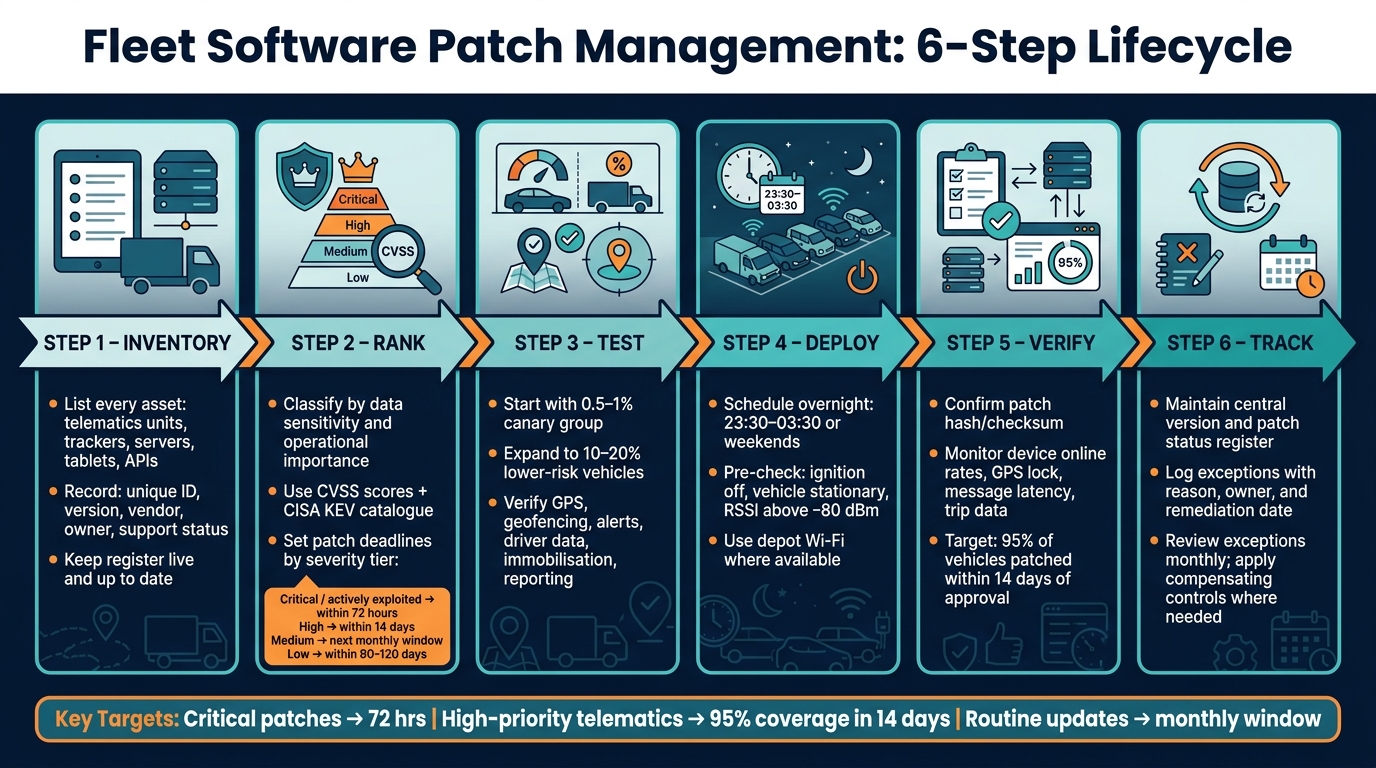
Fleet Software Patch Management: 6-Step Lifecycle
How to build a patch management plan for fleet systems
A patch management plan turns one-off updates into a repeatable, auditable process.
Create an asset inventory and classify critical systems
Only patch what’s in the register. Start with one central asset register that covers every layer of your fleet tech: on-vehicle devices such as telematics units, van trackers, vehicle gateways, tachograph and dashcam devices; back-office servers and network infrastructure; user endpoints such as tablets and smartphones running fleet apps; and APIs, middleware, and integrations with HR, maintenance, or routing systems.
For each asset, record at least:
- a unique ID
- asset type
- location
- responsible owner
- version
- vendor
- support status
- update method
Keep that register up to date. If it drifts, patching starts to drift with it.
Once everything is listed, classify each asset using two lenses: operational importance and data sensitivity. A device linked to sensitive or high-value loads belongs in a higher risk tier than one used on a low-sensitivity route. Systems that store driver identifiers, vehicle GPS history, or high-value load details should be marked as high sensitivity. That classification then sets your patch deadlines.
The register becomes the base for patch priority, timing, and exception handling.
Set rules for routine and emergency patching
Once assets are classified, set two clear rule sets: one for normal patching and one for urgent cases.
Routine patching covers low- and medium-severity updates applied on a set monthly schedule, usually in the evening or at weekends. Emergency patching starts when a vulnerability is rated high or critical, is under active exploitation, or appears in a vendor or national cyber alert. In those cases, use documented triggers, fast-track approval, and accelerated testing before wider rollout.
A practical timeline framework, aligned with NIST-informed practice, looks like this:
| Severity | Asset tier | Target remediation |
|---|---|---|
| Critical / actively exploited | Mission-critical | Within 72 hours |
| High | Mission-critical or important | Within 14 days |
| Medium | Important | Next monthly window |
| Low | Non-critical | Within 90–120 days |
These timelines need to sit in policy, not in someone’s head. That keeps decisions consistent and easier to defend during an audit or after an incident.
Once the rules are in place, each patch can be ranked, tested, and rolled out in the right order.
Assign ownership, approvals and audit records
Patching without clear ownership is where things fall apart. Someone has to own each stage: spotting relevant patches, assessing risk, approving deployment, carrying out testing, and watching for issues afterwards.
In larger fleets, those jobs may sit with different people. In smaller operations, one IT-savvy transport manager might handle several of them. That’s fine, but it needs to be written down so there’s no confusion when an urgent fix lands.
For every major patch decision, log:
- the patch or CVE reference
- the systems affected
- the risk assessment rationale
- who approved it
- the planned deployment window
- any exceptions and the compensating controls in place
Store everything in one change log or ticketing system, including any rollback or exception.
With assets, rules, and ownership in place, the next step is to rank each patch by risk and test it before rollout.
How to prioritise, schedule and test patches safely
Rank patch priority by risk and vehicle impact
With the asset register and patch rules in place, the next step is simple: decide which patch matters most. Rank each one by risk, exploitability, asset criticality, exposure and business impact.
CVSS is a good starting point, but it shouldn't be the whole story. A flaw tied to a high-value cargo route or a safety-critical telematics function deserves faster action than an issue with limited impact. It also helps to check unpatched flaws against CISA's KEV catalogue, so you can spot issues that attackers are already using in the wild.
After ranking, avoid pushing updates across the whole fleet in one go. Use cohorts instead. Start with a 0.5–1% canary group, then move to 10–20% of lower-risk vehicles. That way, if something goes wrong, you contain the problem instead of spreading it.
Schedule updates around UK operating hours and vehicle downtime
Once risk is ranked, pick the least disruptive update window. In most cases, that means overnight, from 23:30 to 03:30, or at weekends when vehicles are parked.
Before any OTA update, confirm a few basics: the ignition is off, the vehicle is stationary, external power is stable and the signal is strong - ideally RSSI above −80 dBm or a rating of 3 or higher. If the signal drops or the battery dips halfway through a download, firmware can end up corrupted, and recovery gets messy fast.
If depot Wi‑Fi is available, use it. It cuts mobile data spend and often gives a more reliable download than off-peak cellular windows.
Once the timing is locked in, test the patch on a small cohort before moving any further.
Test core telematics functions before wider rollout
Before a patch leaves the canary group, test the core telematics functions that the fleet depends on. That includes:
- GPS accuracy
- Geofencing
- Alerts
- Driver behaviour data
- Immobilisation commands
- Reporting integrations
Back up each test device, verify the patch hash or checksum, and log the rollback route in advance - whether that's an A/B partition switch, bootloader recovery or a vendor uninstall process.
The table below shows the difference between routine and emergency patching at each stage:
| Feature | Routine Patching | Emergency Patching |
|---|---|---|
| Trigger | Scheduled maintenance or feature update | Critical vulnerability or active exploit |
| Testing | Full sandbox and pilot phase | Accelerated testing on core functions only |
| Deployment | Staged over days or weeks | Immediate fleet-wide push once verified |
| Window | Standard low-disruption hours, such as overnight | Immediate, regardless of hour, if risk is extreme |
When the test cohort stays stable, record the version and patch status before the wider rollout.
How to track versions and keep mixed fleets stable
Use a central version and patch status register
Once testing is done, the job shifts from rollout planning to day-to-day version control. After the canary rollout passes and broader deployment starts, keep a central version and patch status register that shows what is actually installed across the fleet.
That register should record:
- asset ID
- type
- platform
- model
- current version
- patch level
- status
- deployment time (dd/mm/yyyy, 24-hour clock)
- owner
- ticket reference
A live register gives you the ground truth. It shows which devices are behind, which installs failed, and which units are blocked from updating. Keep it in the fleet management system or CMDB, with views by depot, region and operating pattern. For instance, you may want separate views for urban delivery vans and long-haul HGVs.
Monitor fleet stability and manage exceptions
Use the register to decide if the next segment is ready to move. Post-patch monitoring should cover both technical and operational indicators: device online/offline rates, SIM or network error counts, GPS lock reliability, message latency, trip data completeness, fuel-usage reporting accuracy and driver behaviour scoring.
These measures help protect the core functions that fleet security relies on - GPS accuracy, alerting, message latency and reporting integrity.
Track critical telematics patches to 95% of vehicles within 14 days of approval. If coverage falls or the post-patch incident rate goes up, investigate missed assets or change the segmentation before starting the next wave.
When a vehicle cannot be patched straight away - because it is always in service, the hardware is incompatible, or supplier support is not available for a period - log it in the central register with the reason, a risk assessment, a planned remediation date and a named owner.
Compensating controls may include:
- network segmentation
- tighter access controls
- physical security improvements
- temporarily disabling high-risk remote functions
Review exceptions monthly.
Apply the process across mixed fleets and GRS Fleet Telematics devices
Version tracking matters even more when hardware and duty cycles differ across the fleet. Different vehicle models and device generations can behave in different ways during rollout. That is why segmentation matters.
Group devices by vehicle model, generation and duty cycle. Deploy updates to lower-risk segments first, monitor stability for 24–72 hours, then expand in stages.
For GRS Fleet Telematics, track each device generation and firmware line separately. After any patch, verify that alerting, remote immobilisation commands and location accuracy are all working as expected.
The table below sums up the main metrics that UK fleet and IT teams should track as part of patch governance:
| Metric | Definition | Why it matters for fleet stability |
|---|---|---|
| Patch success rate | Percentage of devices that successfully installed the latest update | Identifies systemic failures or device models prone to update errors |
| Mean time to patch (MTTP) | Average time taken from patch approval to successful deployment on each asset | Measures the fleet's exposure window to known vulnerabilities |
| Rollback rate | Number of rollbacks divided by total deployments | Indicates software instability or compatibility issues with specific configurations |
| Coverage percentage | Proportion of the fleet running the current approved version | Shows overall patch posture and residual vulnerability exposure |
| Post-patch incident rate | Connectivity or data-quality incidents after a patch | Flags compatibility issues for specific vehicle models or device generations |
| Data completeness | Completeness and accuracy of telematics fields after a patch | Confirms updates haven't degraded core tracking or reporting functions |
| Exception count | Number of assets formally logged as unable to receive the current patch | Tracks residual risk and prompts timely remediation or compensating controls |
Used in weekly or monthly review meetings, this table gives operations and IT teams a shared way to discuss patch campaigns - and a clear signal when a metric starts moving the wrong way.
Conclusion: A practical patch lifecycle for secure fleet operations
Patch management is a repeatable cycle that helps keep fleet software secure and stable across devices, platforms and integrations.
It starts with asset inventory and moves through risk ranking, scheduling, testing, version tracking and ongoing monitoring. In mixed fleets, that process matters even more, because device generations and duty cycles don’t always match.
For UK mixed fleets, consistency matters more than perfection. Planned, tested updates can cut tracking outages, lower rollback risk and help keep integrations stable. That applies directly to GRS Fleet Telematics devices.
If your fleet uses GRS Fleet Telematics devices, track each device generation and firmware line in your central register. After every patch cycle, check that live location, driver ID and alerts are all working as expected. It also helps to co-ordinate with your provider on timing and test results, so scheduling stays in step with your fleet operations.
The aim is simple: protect sensitive data, reduce disruption and keep telematics dependable, whether you run a small urban delivery fleet or a large mixed operation across multiple UK depots.
FAQs
How do I start a fleet patch register?
Start by listing every vehicle hardware and software component, along with the exact version for each one. Then use your fleet management software to keep a central log showing which assets have the latest updates and what firmware level each vehicle is running.
Add unique identifiers for each vehicle, such as individual X.509 certificates, and audit the register on a regular basis alongside security monitoring. This helps support UK GDPR compliance and telematics stability.
What should I do if a vehicle misses a patch?
Check your fleet management software to see if the vehicle got the latest update. A lot of systems will retry the patch on their own, so start by checking the device status in your telematics dashboard.
If the patch still fails, use real-time telemetry to spot problems like an unstable connection or a hardware mismatch.
How can I patch mixed fleets without downtime?
Use OTA firmware updates to deploy patches remotely, so you don’t need to send vehicles to a workshop. With A/B partitioning - also called a blue-green approach - the new firmware is installed on an inactive partition while the vehicle keeps running on the current version.
The system switches over only after the update is verified. If the update fails, it automatically reverts to the previous version. It’s also smart to schedule updates during off-peak hours and start with staged roll-outs first.