
How Telematics APIs Link with Fleet Software
Treat telematics APIs as data feeds and command paths: map every hand-off, enforce least privilege, secure webhooks and audit actions.
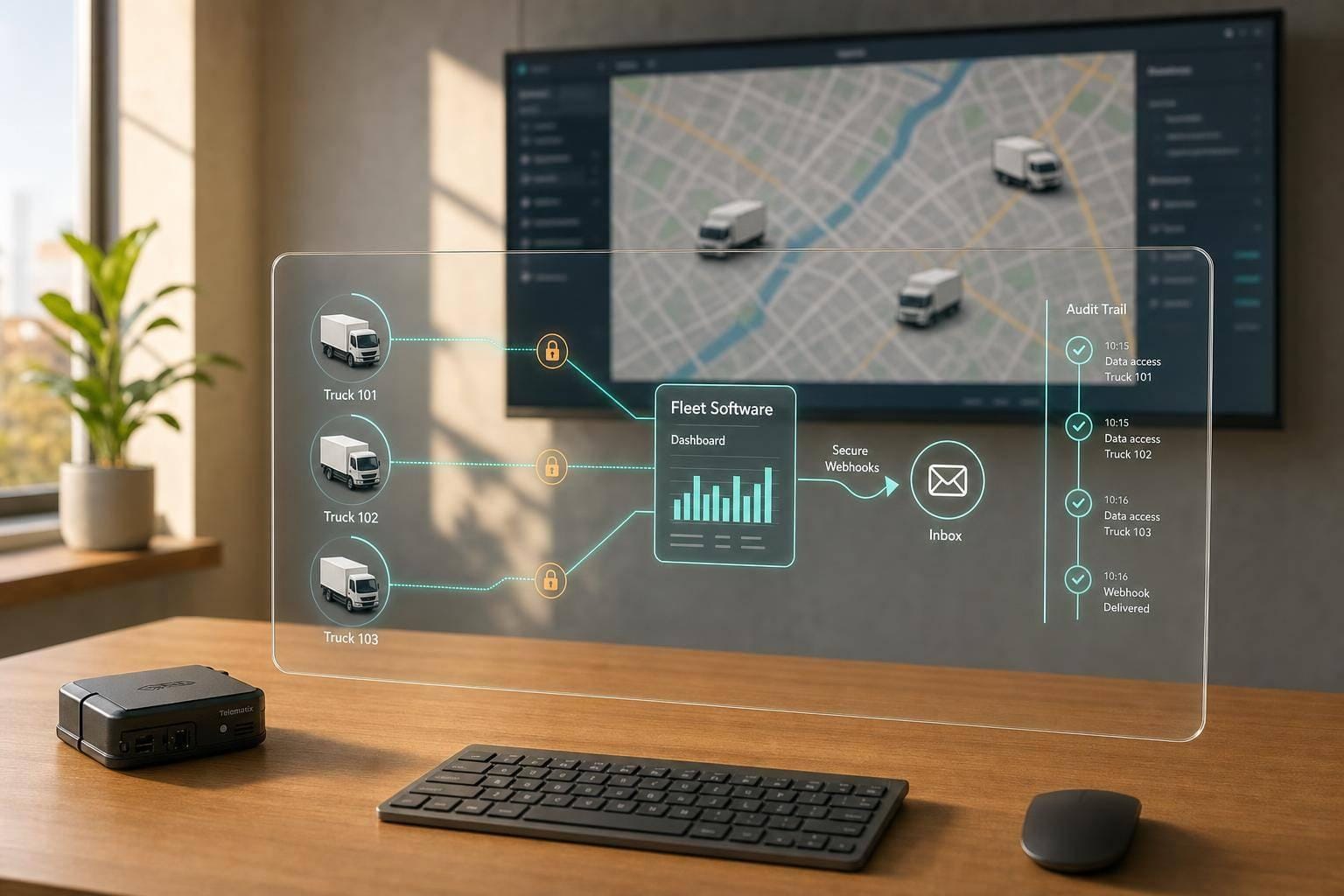
A telematics API links vehicle trackers to fleet software, but the hard part is not the data feed - it’s control, access, and audit. If I were setting this up today, I’d focus on five things first: map the data path, limit what each system can do, secure tokens and webhooks, split read access from command access, and log every action in UTC.
Here’s the article in plain terms:
- What moves through the API: vehicle IDs, GPS position, speed, ignition status, trip history, odometer data, fault data, and driver IDs
- Where the risks sit: at each hand-off from device to mobile network, cloud platform, API, webhook, fleet software, and reporting tools
- How to secure access: use scoped credentials, short-lived tokens, separate test and live environments, and store secrets in a vault
- How to protect webhooks: enforce TLS 1.2+ or TLS 1.3, verify HMAC signatures, check replay windows, and filter source IPs
- How to control people and systems: give dispatchers, managers, maintenance teams, drivers, and service accounts only the access they need
- What usually goes wrong with fleet integration: weak object checks, too much data in responses, old TLS versions, poor rate limits, and missing audit logs
- What UK fleets must cover: UK GDPR duties, a DPIA for driver-linked tracking, retention rules, and driver notice
A few points stand out. The article notes that live updates can reach dispatch within seconds under normal conditions, short-lived access tokens often last 15 to 60 minutes, static keys should usually rotate every 60 to 90 days, and audit logs should often stay available for 12 to 24 months. It also suggests trip-history access limits such as 7 to 14 days for dispatchers and around 90 days for fleet managers, depending on role.
If you want the short version, it’s this: treat the API as both a data feed and a remote command path. That means I wouldn’t connect anything until I knew exactly what data moves, who can see it, who can act on it, and how every request is checked and recorded.
Map the data flow before connecting any systems
Map the full chain first: device → mobile network → telematics cloud → API/webhook layer → fleet software → reporting and maintenance tools. That gives you a plain view of how data moves from the vehicle to the systems your team uses every day.
Each step in that chain is a place where data can be intercepted, set up the wrong way, or dropped. Every hand-off is also a point where data may be exposed. Once you can see the route clearly, it becomes much easier to decide where polling should sit, where webhooks make sense, and where access controls need to be tighter.
Document the route from device to software
Start with the tracker. Write down exactly what the device collects - GPS coordinates, speed, ignition status, CAN bus data, driver ID - and how often it sends each item. Some trackers send data at fixed intervals. Others send it when something happens, such as harsh braking or ignition on/off.
You should also check what happens when mobile coverage drops. Does the device buffer data locally and send it later? If it does, that stored data needs to be on your map too. It still has to reach the cloud, so it still matters.
From there, the data moves over the mobile network to the telematics provider's cloud. It reaches an ingestion endpoint, gets processed and normalised, and is then made available through the API/webhook layer. At that stage, your fleet software either polls on a schedule or receives webhook events in real time.
Use both when it makes sense. Webhooks suit time-sensitive alerts like panic button presses or geofence breaches. Scheduled polling works better for bulk history and reporting.
| Model | How it works | Best suited for | Watch out for |
|---|---|---|---|
| Polling | Your software requests updates on a schedule | Batch reporting, historical data | Higher API load at short intervals; slight latency |
| Webhooks | The telematics platform pushes events as they happen | Panic alerts, geofence breaches, theft events | Requires a public endpoint with signed payload validation |
On your diagram, mark every hand-off with the data type being passed along - location, speed, engine faults, driver updates, route status. That way, anyone looking at the map can see what is moving, where it is going, and what it is for.
List the systems, users and control points involved
Once the route is mapped, build a register of everything tied to it. Include the telematics platform, your fleet management or TMS system, any maintenance or workshop tools that use odometer or fault data, BI dashboards, and customer portals.
Next, list the people and accounts with access. That includes service accounts, admins, dispatchers, and maintenance users, along with any third-party tools that receive webhook events.
Then mark the main control points:
- Webhook endpoint URLs
- API credentials and where they are stored
- Firewall rules
- Logging locations
These are the highest-risk areas, so call them out early. Once they are listed, you can set access and logging rules with far less guesswork. That register then becomes the starting point for API security best practices for authentication and permissions.
sbb-itb-499a7f0
Set up the integration with secure authentication and connectivity
Once the data flow is clear, lock down the connection. Reused keys, expired tokens and secrets sitting in spreadsheets leave easy holes. Use the webhook URLs, credentials and firewall rules you identified earlier to put the right controls in place.
Use scoped credentials, token rotation and secure storage
Don’t use a master API key in production. Set up a separate API key or OAuth client for each integration use case. If a dispatch system only needs to read vehicle locations, give it read-only access. If a security platform can trigger remote immobilisation, it needs write access for that command alone, not for the whole platform.
Least privilege cuts the blast radius if a credential is exposed.
For token lifetimes, short-lived access tokens - usually 15 to 60 minutes - are much safer than long-lived static keys. Back that up with automated refresh so the fleet system renews tokens in the background without interrupting live tracking. If you still use static API keys, rotate them every 60 to 90 days and allow a short overlap window.
Keep test and production credentials completely separate. That means different base URLs, different secrets and clearly labelled environments. Otherwise, one wrong key can turn a test immobilisation command into a live one, and that’s not a mistake anyone wants to explain later.
Store API keys, OAuth client secrets and webhook signing keys in a secrets manager. Pull them at runtime. Don’t hard-code them in source code or config files.
Protect API traffic and inbound webhooks
All traffic between your fleet software and the telematics platform should run over TLS 1.2 or higher - and TLS 1.3 where it’s available. That covers outbound API calls and the webhook endpoint your system uses for inbound events. Turn off older protocols and make sure certificate validation is enforced at both ends.
Protect inbound webhooks with HMAC signatures. The telematics platform signs each event with a shared secret, and your webhook handler should verify that signature before doing anything with the payload. Reject unsigned or stale messages straight away.
Add IP allow-listing at the firewall or reverse proxy so only the telematics provider’s known IP ranges can reach your webhook endpoint. For high-risk commands such as remote immobilisation, door unlock and configuration changes, use mutual TLS (mTLS). That way, both client and server must present valid certificates.
Your webhook handler also needs to be idempotent. If the same event arrives twice, it shouldn’t create duplicate records or fire the same action twice. Agree rate limits with your telematics provider before go-live. UK fleets with heavy delivery volumes, especially during peak periods, can produce traffic spikes that swamp downstream systems if there’s no queue or buffer in place.
Log API calls, token issuance and webhook events in UTC with timezone labels. Keep those logs for 12 to 24 months as an audit control for fleet access and webhook activity.
Authentication methods compared for fleet integrations
The right authentication method depends on what the integration does and how sensitive the data or commands are.
| Method | Setup effort | Security strength | Suitable use |
|---|---|---|---|
| API keys | Low | Moderate, especially with IP allow-listing and rotation | Basic data pulls and lower-sensitivity exports |
| OAuth 2.0 client credentials | Medium | Strong, with short-lived tokens and fine-grained scopes | Continuous telemetry and event feeds |
| mTLS | High | Very strong, with mutual certificate authentication | High-risk commands and sensitive endpoints |
Use OAuth 2.0 for ongoing telemetry and event feeds, API keys with IP controls for lower-sensitivity exports, and mTLS for security-critical commands. Then narrow those permissions even more by role and event type.
Apply role-based access and controlled event sharing
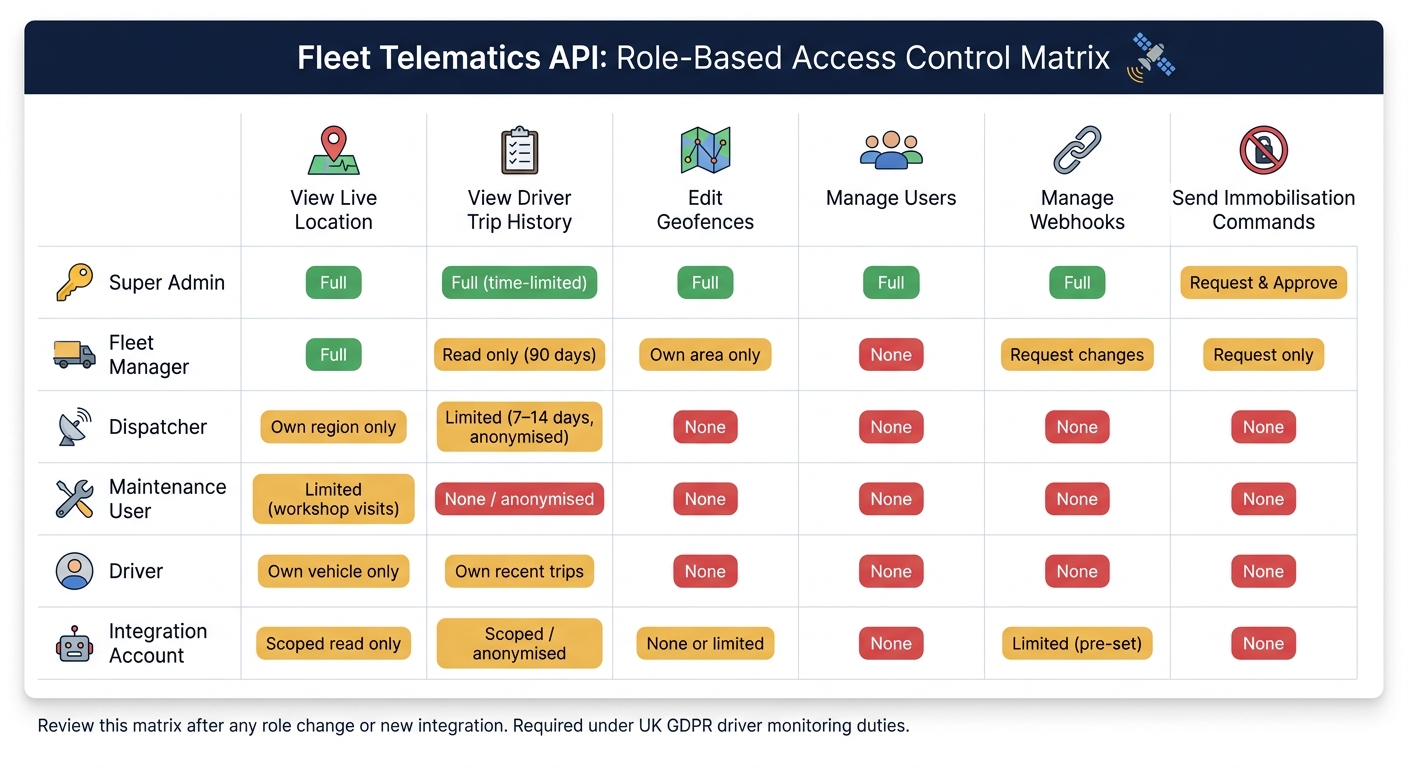
Fleet Telematics API: Role-Based Access Control Matrix
Once a user or system is signed in, the next step is simple: only give access to the data and actions needed for that job. That means using role-based access control to stop people and systems seeing more than they should. The scopes set during authentication should shape what each role can view or do.
Assign roles by job function and risk level
Treat each role as a hard boundary, not just a title. In practice, that boundary decides access to API data and actions such as live location, driver-linked trip history, fault codes, and remote commands.
A super admin needs full control of the system. That includes user provisioning, API key management, approval of API scopes, and audit logs. But this role should sit with a very small group of senior IT or compliance staff. It should never be used for day-to-day work.
A fleet manager can view live locations and driver-linked trip history, edit geofences for their area, and request vehicle immobilisation through an approval workflow.
A dispatcher works with current vehicle positions and job status for their region. Their access to driver-linked trip history should be capped at 7–14 days and anonymised where possible.
Maintenance users should only work with odometer readings, fault codes, and service schedules.
Drivers should only see their own trips and performance data in a mobile app.
Integration accounts - the service accounts used by your transport management or security systems - should be non-human accounts watched for unusual activity. They should have no interactive login access and no UI-level privileges.
Limit webhook events and control permissions
Only subscribe to webhook events that tie to a real business process. For most fleets, that means:
- trip completion for job billing
- geofence entry and exit for arrival notices
- ignition on and off for working-time checks
- theft or tamper alerts for security response
Read access and command access should stay separate at both UI and API level. Most users - dispatchers, maintenance staff, and drivers - should be read-only. Remote vehicle immobilisation should be restricted to named roles, protected by multi-factor authentication and two-person approval.
Every immobilisation command should record who asked for it, when it happened, which vehicle was involved, and which client or IP sent the request.
Once roles and event feeds are cut back to what’s needed, you can move on to the remaining API weak points and hardening steps.
Permissions matrix for fleet access control
Map these roles against the data types in your integration flow. The table below shows how typical fleet roles line up with key capabilities. Use it as a starting point, then adjust it to match your team structure and UK GDPR duties.
| Role | View live location | View driver-linked trip history | Edit geofences | Manage users | Manage webhooks | Send immobilisation commands |
|---|---|---|---|---|---|---|
| Super admin | Full | Full (time-limited) | Full | Full | Full | Request and approve |
| Fleet manager | Full | Read only (90 days) | Own area only | None | Request changes | Request only |
| Dispatcher | Own region only | Limited (7–14 days, anonymised) | None | None | None | None |
| Maintenance user | Limited (workshop visits) | None or anonymised | None | None | None | None |
| Driver | Own vehicle only | Own recent trips | None | None | None | None |
| Integration account | Scoped read only | Scoped / anonymised | None or limited | None | Limited (pre-set) | None |
Review this matrix whenever staff move roles or when a new integration is added. It also works as a practical audit record if a UK regulator or client asks how access to driver and vehicle data is controlled.
Close common security gaps and build an integration checklist
Common API weaknesses in telematics setups
Once roles and permissions are in place, the next job is to look for API flaws that can slip past them. Access may be scoped on paper, but a weak API can still leak data or let someone trigger actions they should never reach.
Broken object-level authorisation (BOLA) is still the top issue in the OWASP API Security Top 10 (2023). This happens when an API accepts a vehicle ID or driver ID in a request but fails to check whether the caller should see that record. In a telematics setup, one bad integration could switch one vehicle ID for another and pull journey history it was never supposed to access.
Excessive data exposure is another common problem. Put simply, the API sends back more fields than the integration needs. For example, a route-optimisation tool that only needs a current position should not also receive full driver profiles, licence details, or old stop locations.
Missing rate limits and weak input validation create another opening. They can let attackers scrape records at scale or fire off expensive queries that push up costs and strain the system.
You should also audit for legacy TLS versions, especially 1.0 and 1.1, along with incomplete audit logging. If logs do not record caller identity, endpoint, IP address, and outcome, you lose the trail you need when something goes wrong. Old transport protocols can expose credentials and live location data to interception. Poor logging makes it much harder to spot off-hours command spikes or odd bulk downloads.
Hardening steps for UK fleet compliance and monitoring
Use the gaps above as a working list for control checks.
Start with the basics: inventory every endpoint, credential, and integration account. Revoke scopes that are no longer used. Keep secrets in a vault. Rotate tokens on a fixed schedule. And when a contract ends or a staff member moves role, review the scopes on every integration account straight away.
For UK fleets that handle driver-linked tracking data, a Data Protection Impact Assessment (DPIA) must be completed before deployment. Under UK GDPR Article 35, this is a legal requirement for most worker-monitoring telematics setups. The DPIA needs to set out the lawful basis for tracking, the data fields collected, retention limits, and how drivers are told about the monitoring.
On retention, detailed journey data is often kept for 30 to 90 days, while summary data may be kept for longer where there is a clear legal or tax reason. If retention goes beyond 31 days, that needs written justification. Your integration should handle this automatically, so data is deleted once the retention window ends.
Conclusion: linking telematics APIs with fleet software safely
Turn the findings into an internal review list:
- Document all systems - list every device, platform, and integration account in the data flow.
- Define data fields - state which fields each integration needs and strip out everything else from API responses.
- Create scoped credentials - issue separate, time-limited tokens for each integration, keep them in a vault, and rotate them on schedule.
- Secure webhooks - enforce HTTPS, check signatures on every inbound event, add replay protection, and apply rate limits.
- Review permissions after any role or integration change - use the role matrix from the previous section and revisit it whenever staff change roles or new integrations are added.
- Log and alert - record caller identity, timestamp, IP address, endpoint, and outcome for every API call; set alerts for unusual patterns such as off-hours command spikes.
- Confirm UK GDPR responsibilities - complete a DPIA, document retention limits, set up automated deletion, and make sure drivers are told what is tracked and why.
Work through this list during setup, then review it at regular intervals and after any major integration change.
FAQs
Do I need polling, webhooks, or both?
To keep things lean and cut resource use, put webhooks or streaming ahead of frequent polling. Polling keeps asking the server for updates. Event-driven methods work differently: they send data on their own when something happens, like a vehicle entering a geofenced area.
If you do need API requests, use eager loading to pull related data into a single call. That cuts down the number of HTTP requests.
What data should each team access?
Use the principle of least privilege so each team can access only the data needed for its role. Role-based access control is a simple way to enforce that. It also helps support UK GDPR compliance.
In practice, access should match the job.
- Fleet managers may need full access to tracking, reporting, and vehicle performance data.
- Drivers should usually see only details for their own vehicle.
- Administrative staff should, in most cases, be limited to anonymised usage metrics.
Some actions need tighter control. Remote vehicle immobilisation is a good example. That kind of high-risk function should be limited to authorised personnel only.
How can I secure remote vehicle commands?
Limit access to authorised personnel only, such as senior management or a dedicated security team. Use strong authentication, including OAuth 2.0 and, where possible, multi-factor authentication.
Encrypt all communication with TLS 1.2 or higher, keep detailed audit logs, and use role-based access control so only verified users can carry out sensitive vehicle commands.