
Best Practices for Theft Reporting in Fleets
Report stolen fleet vehicles fast, standardise incident data, use telematics for timelines, and follow clear escalation and audit steps.
If a fleet vehicle is stolen, the first hour matters most. In this guide, I focus on one simple point: report fast, record the same details every time, and send the case to the right people without delay.
In plain terms, a solid theft reporting process should help you:
- confirm whether it is theft or a mix-up
- report to police within 60 minutes
- use telematics data to check the timeline
- alert managers, insurers, and monitoring teams in the right order
- spot repeat theft patterns by depot, shift, vehicle type, or postcode
- handle recovery and post-recovery checks safely
- review response times, missing data, and missed alerts on a set schedule
That matters because vehicle theft in England and Wales reached 132,000+ cases in 2023/24, and telematics-backed recovery can hit 91% when action starts at once. For me, the takeaway is simple: theft reporting is not admin to leave until later. It is a day-one control that can cut downtime, support claims, and help keep drivers safe.
This article breaks that process into eight clear steps, from policy writing to audits, so you can turn a messy response into one repeatable system.
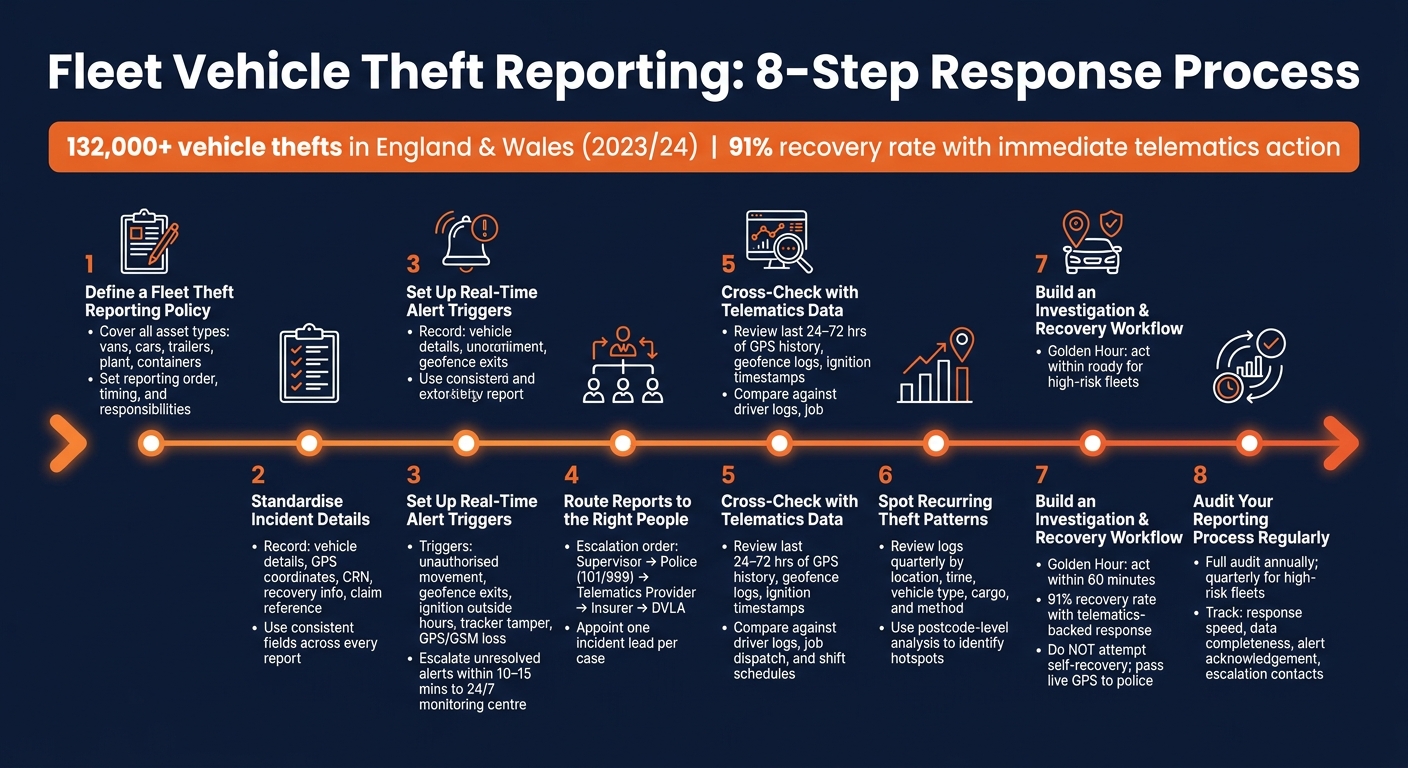
Fleet Vehicle Theft Reporting: 8-Step Response Process
1. Define a Fleet Theft Reporting Policy
A theft reporting policy should spell out what must be reported, who needs to know, and what happens next.
Once it's written, every incident should follow the same path. No guesswork. No mixed messages.
Set out which thefts must be reported, who takes action, and how fast they need to move. Cover vans, cars, trailers, plant, and containers.
Be clear on the reporting order and timing. Before reporting, drivers should confirm the theft by checking whether the vehicle was relocated, mislaid, or impounded. If the theft is happening live, call 999. If the vehicle is discovered missing later, call 101. Then alert the supervisor or fleet manager. The fleet manager should notify the insurer at once so the Motor Insurance Database can be updated.
That gives the business one clear record to use for police, insurer, and internal reporting.
File the police report and get the Crime Reference Number within 60 minutes. It is needed for insurance claims and DVLA notifications.
Staff must never try to find or confront thieves, even if live telematics data shows where the asset is.
Record the same core details for every incident so police, insurers, and managers are all working from one version of events.
The next step is to standardise the incident details recorded in every report.
sbb-itb-499a7f0
2. Standardise Incident Details
Once the reporting route is set, make the fields consistent. Every theft report should include the same information. If one report is missing key details and another uses different wording or formats, things get messy fast. Claims take longer, police work slows down, and repeat patterns are easier to miss.
Use the same fields in every report:
| Category | Details to Record |
|---|---|
| Vehicle details | Make, model, registration, colour, and tracker ID |
| Event details | Exact time of the theft alert and last known GPS coordinates |
| Evidence | Route history and tracking logs |
| Police details | Crime Reference Number (CRN) and officer name and collar number |
| Recovery details | Time and location of recovery, plus post-recovery inspection findings |
| Claim details | Estimated damage costs and insurance claim reference number |
Pull GPS coordinates and time-stamped alerts straight from your telematics system where possible. That cuts manual entry and helps keep records aligned across drivers, depots, and rental shifts.
Post-recovery checks should be mandatory. Look for ECU or OBD tampering, hidden GPS tags, and any damage or security faults before the vehicle goes back into service.
Those records then support alerting, investigation, and recovery decisions.
3. Set Up Real-Time Alert Triggers
With the incident fields fixed, the next job is to set alerts that flag theft the moment it starts.
The most useful triggers are:
- Unauthorised movement outside working hours
- Geofence exits from depots or job sites
- Unauthorised ignition or engine start outside scheduled hours
- Tracker tamper or power loss
- Signal jamming or GPS/GSM loss
It also helps to layer triggers together. For example, if a vehicle moves and there’s no authorised driver ID tag present, you’re far less likely to get a false alarm. That gives you faster action without flooding staff with noise.
Use these triggers to set thresholds based on operating hours. In practice, that means movement alerts should fire only outside planned hours, such as 18:00–07:00 on weekdays, plus weekends and bank holidays. Set geofence boundaries at a 50–100 metre radius to allow for normal GPS drift. That keeps alert volume under control and makes each notification more likely to be taken seriously.
Critical alerts - confirmed unauthorised movement, tamper events, and signal jamming - should go out at once by SMS or app notification to the on-call manager. If no one acts within five minutes, escalate it. If the alert is still unresolved after 10–15 minutes, pass it to a 24/7 monitoring centre. Use dual-tracker technology that detects tampering, switches to backup tracking, and sends immediate loss-of-signal alerts.
Each alert should include the vehicle ID, event type, timestamp, last known location and map link. That way, the person receiving it can act straight away instead of logging in and hunting for details.
4. Route Reports to the Right People
When a theft alert goes off, send it to the right people straight away. Pick one incident lead to manage the whole response. That person should coordinate the driver, police, insurer, and recovery provider. Once the alert is confirmed, use the same reporting chain every time so nothing slips through.
Once theft is confirmed, follow this sequence:
| Escalation Step | Primary Recipient | Information Required |
|---|---|---|
| 1. Internal Alert | Supervisor / Fleet Manager | Driver ID, last known location, key status |
| 2. Law Enforcement | Local Police (non-emergency: 101) | Registration, make/model, company name, crime location |
| 3. Recovery Support | Van tracking solutions / Security Provider | Police crime reference number, permission to track the vehicle |
| 4. Insurance | Insurance Provider | Police report number, policy details, incident description |
| 5. Regulatory | DVLA (if unrecovered) | Form V33, police crime reference number |
Stick to this order for every incident. It keeps handoffs clean and cuts the chance of a missed step.
Drivers should have a short checklist ready for the police call:
- Registration
- Make
- Model
- Colour
- Theft time
One point matters here: drivers must not try to find the vehicle themselves or confront thieves. If live tracking data is available, pass it to the police through the proper reporting route.
If the vehicle is still unrecovered after 30 days, follow the insurer’s instructions and notify the DVLA with form V33 where needed.
After the report has been routed, check the event against telematics data. That can help with both recovery efforts and insurance claims.
5. Cross-Check Reports with Telematics Data
Once the report has been routed, check it against telematics data before you pass it to police, insurers, or recovery teams. Look at four data sets: GPS history, geofence breach logs, ignition timestamps, and movement logs. Together, they help build a clear timeline that either backs up the report or shows that something doesn’t add up.
Start with the last 24 to 72 hours of GPS history. Check the last known location, the route, and the time of movement. If the report clashes with the GPS timeline, stop and clear up the facts before escalating. If the vehicle left a geofenced site at an unusual hour, that data points towards theft.
Then compare the telematics trail with driver logs, job dispatch records, shift schedules, and site access records. A van marked as missing may just be out on an unlogged delivery, or it may have been moved for maintenance. When the data and the report don’t match, pause the report and verify the timeline first.
If the evidence rules out theft, record it as a non-theft incident. If the data confirms theft, escalate at once and keep the telematics records safe - GPS exports, geofence alert logs, and screenshots - so police and insurers can use them as evidence.
Using white-label van tracking solutions with dual-tracker data adds weight to the evidence trail.
6. Spot and Act on Recurring Theft Patterns
Once a theft is confirmed, the next step is to use your incident log to find repeat risk. One theft report tells you what happened once. Put a batch of reports side by side, and you start to see where risk keeps showing up. That’s when reporting stops being admin and starts helping you prevent the next loss.
Review incident logs at least every quarter. Check for clusters by location, time, vehicle type, cargo type and theft method. Record the security controls that were in place as well. A pivot table in Excel or Google Sheets makes this much easier, because you can group incidents from your standardised log and compare them properly. Postcode-level analysis can also help you spot repeat hotspots. Use those clusters to decide where changes are needed.
Patterns should lead to specific action, not vague concern. If thefts keep happening near a certain depot or street, change the parking policy and tighten physical controls such as lighting, CCTV and secure compound access. If incidents spike overnight or at weekends, require high-value tools to be removed from vehicles at the end of each shift. If the same van model appears again and again in reports, move it up the list for added security, such as:
- Additional deadlocks
- Stricter key controls
- Dual-tracker devices
Data helps, but it never tells the whole story. Drivers and depot managers often know things the report misses: a badly lit site they try to avoid, or a customer location where vehicles are left unattended with doors open during loading. Add a short “driver observations” field to your incident forms and bring recent incidents into team briefings.
Feed these patterns into your investigation and recovery workflow.
7. Build a Clear Investigation and Recovery Workflow
Once you spot repeat patterns, every confirmed theft should move through the same recovery process. In vehicle recovery, the first 60 minutes are often called the Golden Hour.
Start by checking that the vehicle hasn't simply been moved, impounded, or parked in the wrong place. If theft is confirmed, report it at once, share the vehicle details and the likely theft window, and log the Crime Reference Number (CRN) in the incident record.
Next, activate theft mode and share live GPS data with police. GRS Fleet Telematics reports a 91% recovery rate for stolen vehicles. Even if you know where the vehicle is, do not try to recover it yourself. Pass the location to police and leave it there. You should also tell your insurer within the first hour and provide the CRN and policy details.
If the vehicle is found, let police finish any forensic work before a specialist carries out a security scan. Thieves may have programmed unauthorised keys or tampered with the ECU. The vehicle should also go through a forensic clean before it goes back into service.
If the vehicle is not found, submit form V33 to stop vehicle tax and claim back any refund due on unused full months.
The table below sums up the main stages and who is responsible for each one:
| Stage | Who Acts | Action |
|---|---|---|
| Verification | Driver, Fleet Manager | Confirm theft; rule out impoundment or staff movement |
| Police Report | Fleet Manager, Police | Report immediately; obtain Crime Reference Number within 60 mins |
| Recovery Activation | Telematics Provider, Police | Activate theft mode; share live GPS data with police |
| Insurance Notification | Fleet Manager, Insurer | Report theft within 1 hour; provide CRN and policy details |
| DVLA/Admin | Fleet Manager, DVLA | Submit form V33 if vehicle is unrecovered or deemed unusable |
| Post-Recovery | Mechanic, forensic specialist | Security scan and forensic clean before return to service |
Record the outcome of every case so your audit can check whether the workflow still works in practice.
8. Audit Your Reporting Process Regularly
Once your reporting workflow is live, don't just leave it alone. Check it on a set schedule so you can catch missed alerts, slow escalation, and out-of-date contact details before they turn into bigger problems.
For theft reporting, run a full audit at least once a year. If you manage a higher-risk fleet, review it every quarter. That's sensible because fleet mix, telematics settings, and insurer rules can change over time.
In each review, look at four things:
- Reporting speed
- Data completeness
- Alert response
- Current escalation contacts
That keeps the process lined up with what’s happening on the ground, not what was written down six months ago.
You’ll also want to track four core metrics. Measure the time between a telematics alert and duty manager acknowledgement. Then measure the time from incident logging to police report submission. Check how often incident records are missing key details, such as the vehicle registration, location, estimated loss (£), or Crime Reference Number. And cross-check internal logs against telematics alerts so you can spot incidents that were never formally reported.
This kind of review often shows things day-to-day work can miss. One depot may be slower than the rest. A certain shift may leave alerts sitting too long. One vehicle type may keep turning up in incident logs. Those patterns matter.
Use what you find to update procedures, contact lists, and retraining. Give each action a clear owner and deadline, then check progress at the next audit. The same findings should also help tighten the trigger and escalation rules below.
| Audit focus | What to look for |
|---|---|
| Response time | Minutes between telematics alert and duty manager acknowledgement |
| Data completeness | Missing fields: registration, location, estimated loss (£), Crime Reference Number |
| Telematics cross-check | Alerts with no corresponding incident report |
| Policy fit | Whether procedures still match insurer conditions and police reporting channels |
| Trend review | Repeat incidents by depot, shift, vehicle type or postcode |
Theft Reporting Triggers and Escalation Table
Turn your standard incident fields and live telematics data into a fixed trigger-and-escalation matrix. This gives your team a clear way to match each incident type to the right response, without second-guessing what happens next.
Use the same reporting fields from your incident log to trigger each response.
| Trigger / Incident Type | Data Captured | Notify | Target Time |
|---|---|---|---|
| Vehicle Theft | Real-time GPS coordinates, timestamp, vehicle ID, travel direction, registration, make/model/colour | Police (999/101), Fleet Manager, 24/7 monitoring centre, Insurer | Immediate - within 5 minutes; act within 60 minutes |
| Attempted Theft | Ignition status, door sensor data, timestamp, CCTV footage if available | Fleet Manager, Security Team | Within 15 minutes |
| Fuel Theft | Fuel level drop, telematics location, engine status, fuel card logs | Fleet Manager | Within 30 minutes |
| Cargo Theft | Cargo bay door sensor, trailer ID, seal integrity, GPS history, manifest details | Fleet Manager, Police, Insurer, Customer | Immediate |
| Equipment Tampering | Power disconnect alert, GPS jammer detection, OBD port status, damage notes | Fleet Manager, Security Specialist/Mechanic | Immediate - before reuse |
For vehicle theft, pass verified live location data to police straight away.
Some alerts need immediate inspection, not just a message to the right person. A jammer or power-loss alert should be treated as a live theft risk. If a vehicle is flagged for tampering, keep it off the road until it has been inspected.
Conclusion
Theft reporting works best when it becomes part of day-to-day fleet operations. That means having a clear policy, using standardised data, setting up live alerts, defining who escalates what, and reviewing the process on a regular basis. When those pieces are in place, theft reporting stops being a box-ticking task and starts working as a real security control.
Once the process is consistent, you can measure how well it performs. Metrics like reporting time, recovery rate, and repeat incident rate give fleet managers hard data they can use to make decisions.
Telematics-backed reporting gives police and insurers verified, time-stamped evidence. That can support faster recovery and cleaner claims. And that’s what makes the system useful during an actual incident, not just in a policy document. Regular audits also help spot missed timelines, incomplete forms, and weak escalation points, so teams can fix problems before they become a pattern.
In day-to-day use, structured theft reporting helps cut losses, speed up recovery, and tighten fleet control.
FAQs
Who should own the theft response process?
The fleet operator should lead the theft response process. That means being the main point of contact for both police and insurers, so there’s no confusion when time matters most.
It also helps to have a clear in-house process. Staff should know exactly who to contact the moment an incident happens, whether that’s a named contact, a supervisor, or the fleet manager. If people are left guessing, precious minutes can slip away.
GRS Fleet Telematics can help here with 24/7 monitoring centres that check alerts and work directly with police to speed up the response.
What counts as enough evidence to confirm theft?
Enough evidence means reliable data that points to criminal activity, not a false alarm.
That can include:
- tampering attempts
- unauthorised engine starts outside working hours
- geofence breaches
- real-time or historical tracking data
When reporting the incident to the police, include the vehicle registration, make, model, colour, and tracking records.
This gives weight to the report and helps you get a Crime Reference Number for insurance claims.
How often should fleet theft procedures be reviewed?
Fleet theft procedures need regular review if you want them to stay fit for purpose as security risks change and safety rules shift.
Routine checks of equipment and day-to-day processes can reveal repeat weak spots and patterns in higher-risk incidents. At the same time, keeping telematics hardware and software up to date helps make sure security protocols and predictive tools can deal with new threats.