Fleet OTA Updates: Security Points That Matter
Secure fleet OTA updates: signed firmware, per-device identity, TLS, RBAC with phishing‑resistant MFA, secure boot and rollback protection.
 By Michael Bar10 min read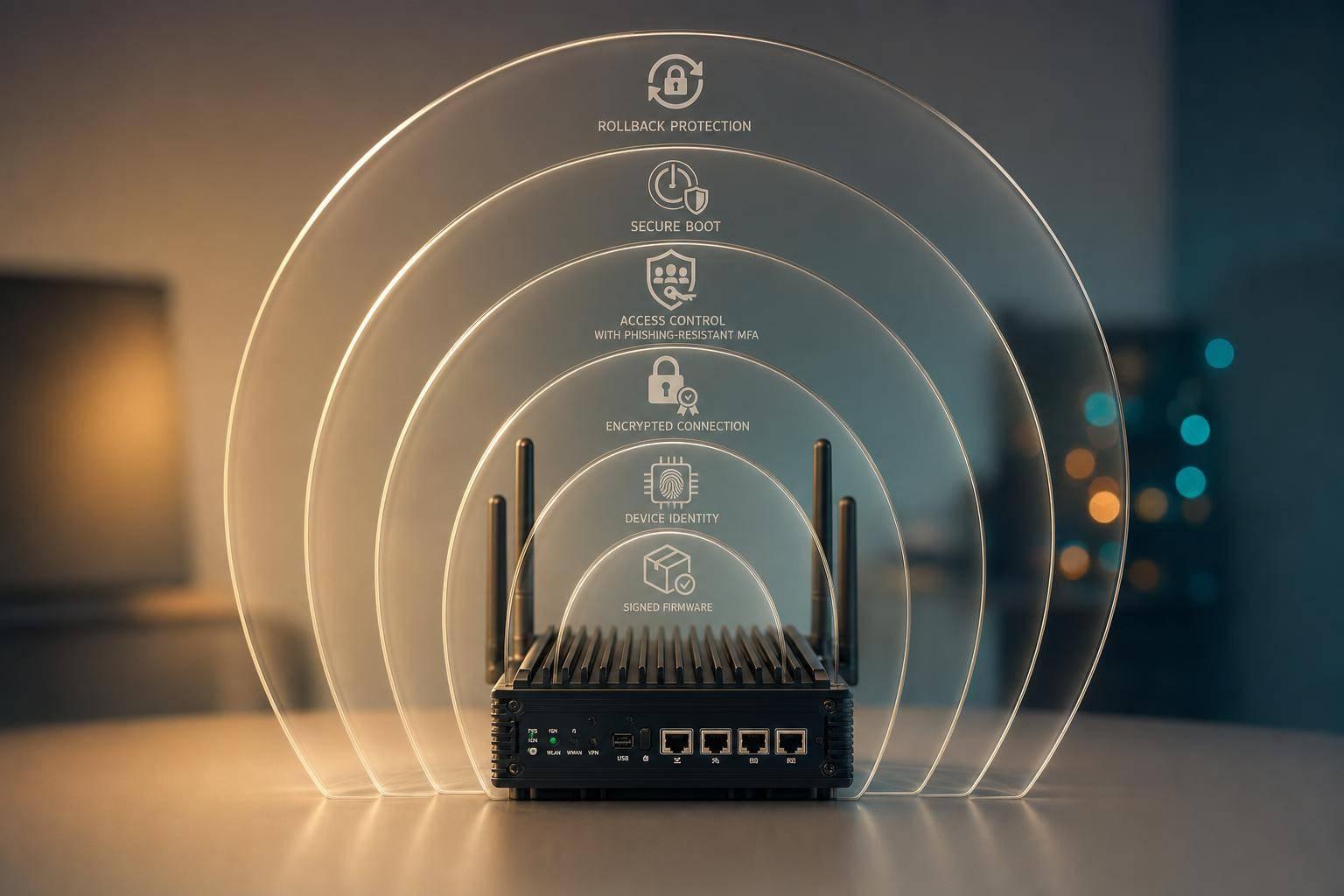
If I had to cut this down to one line, it would be this: OTA updates are only safe when every device checks who sent the update, what the file is, and whether it should run at all.
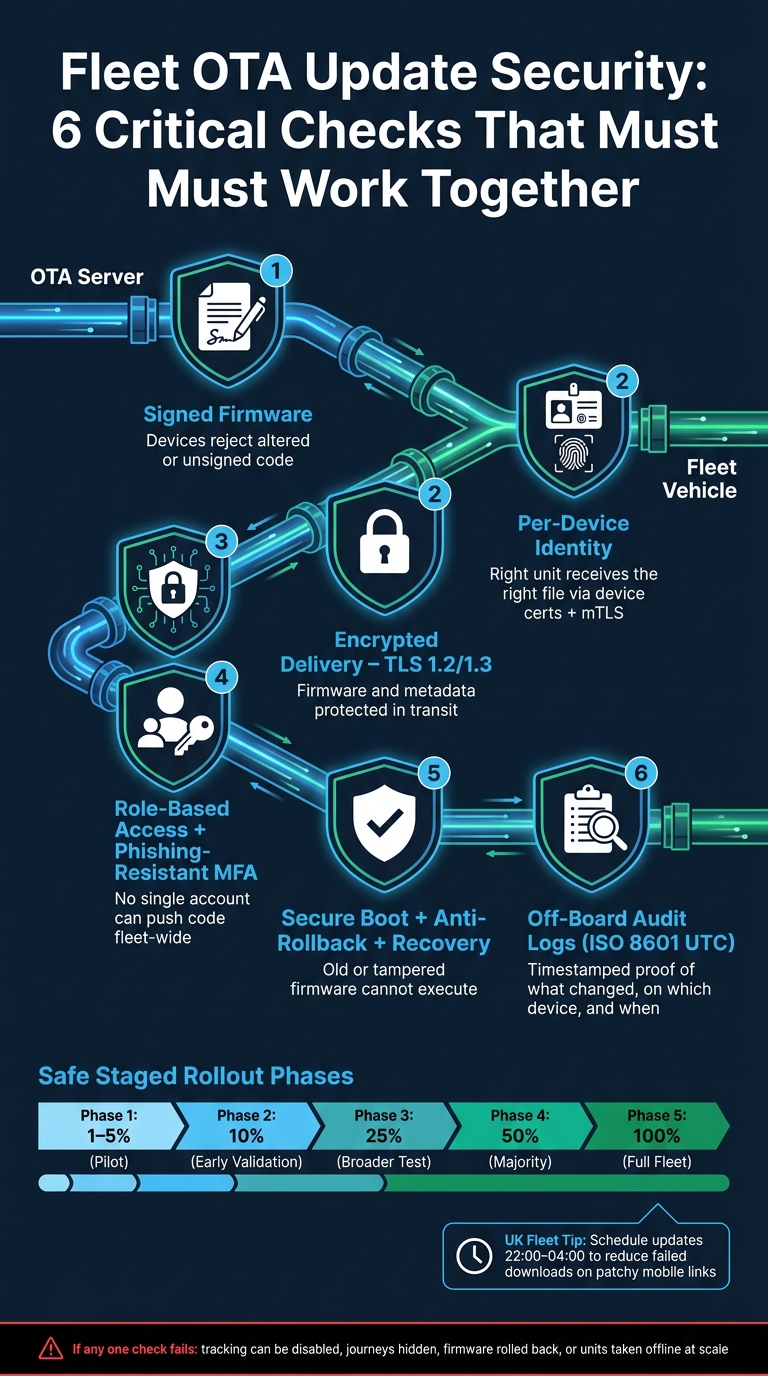
For a UK fleet, that means six checks need to work together:
- Signed firmware so devices reject altered code
- Per-device identity so the right unit gets the right file
- TLS 1.2 or 1.3 so firmware is protected in transit
- Role-based access and phishing-resistant MFA so one account cannot push code across the fleet
- Secure boot, anti-rollback and rollback recovery so bad or old firmware does not take over
- Off-board audit logs with UTC timestamps so you can show what changed, on which device, and when
If even one of those checks is weak, the OTA path can be used to disable tracking, hide journeys, force old firmware back onto devices, or take units offline at scale. That can hit uptime, journey records, fuel checks and HMRC mileage records.
Here’s the short version I’d want in front of me before approving any fleet OTA setup:
| Area | What I’d check first | What can go wrong if it’s missing |
|---|---|---|
| Firmware trust | Signed image and signed manifest | Altered firmware gets installed |
| Device identity | Device certs, private keys in secure hardware, mTLS | One stolen credential spreads across the fleet |
| Delivery | TLS 1.2/1.3, old TLS turned off, pinning where needed | Interception or metadata exposure |
| Access | Split approval roles, MFA, change logs | One account pushes code to all vehicles |
| Device checks | Secure boot, SHA-256 checks, monotonic counters | Old or tampered firmware runs |
| Recovery | A/B slots, staged rollout, watchdog rollback | Fleet-wide outages or bricked units |
| Proof | Append-only off-board logs in ISO 8601 UTC | Poor audit trail after an incident |
A staged rollout also matters. Pushing to 1–5%, then 10%, 25%, 50% and 100% gives you a way to stop a bad release before it spreads. And for UK fleets, scheduling updates in quieter windows such as 22:00–04:00 can cut failed downloads on patchy mobile links.
So the main point is simple: safe OTA is not just about sending firmware over TLS. It is about trust, control, recovery and proof. The rest of this guide and our best practices for IoT patch management break down how each part works in practice.
Fleet OTA Update Security: 6 Critical Checks That Must Work Together
Trusted firmware: signed files and verified device identity
Why firmware signing cannot be skipped
Once the OTA path is in place, the firmware image still needs to prove it came from you. Each firmware image should be signed, and the device should check that signature with an embedded public key before it boots the image. TLS protects the journey. It does not prove the firmware itself is genuine.
The update manifest should be signed too. That manifest carries the version number, target device types and cryptographic hash, so signing it lets the OTA system check both what the update is and which devices it is meant for. Store the highest approved version in tamper-resistant memory and reject older images to block rollback attempts.
How devices prove their identity before receiving an update
Trusted firmware only works if it reaches the correct device.
Give each device its own certificate and private key, stored in secure hardware. Then use mTLS so the device and server can verify each other before any update is sent.
This matters even more in mixed fleets. Mutual authentication helps the backend send the right firmware branch to the right unit, and it lets you revoke one compromised device without disrupting the rest. Shared credentials are best avoided because they make it hard to remove a single compromised unit cleanly.
Keep private keys in tamper-resistant hardware, such as a secure element, to help stop key extraction even if someone gets physical access to the device. In that setup, impersonation needs the hardware-backed key, not just a serial number or IP address.
Once firmware and device identity are trusted, lock down the delivery path.
Secure delivery: encrypted transfer and access control
How encrypted transport protects firmware in transit
Once firmware and device identity are in place, the next step is to lock down the delivery path.
Signed firmware tells the device the code is genuine. But that alone doesn't protect the update while it's moving across the network. TLS 1.2 or 1.3 should be the baseline to protect both firmware and metadata in transit. Use strong cipher suites such as ECDHE with AES-GCM, and disable legacy protocols such as TLS 1.0 and 1.1 in full.
For constrained telematics devices, MQTT over TLS is often a sensible fit. It's lightweight, dependable, and works well where device resources are limited.
Certificate pinning adds another check. Devices are set up to trust only specific server certificates, which means even a mis-issued certificate from a trusted CA can't be used to intercept the update in transit. Use payload encryption only when firmware is stored or relayed by third parties, or when the package includes sensitive IP.
Transport protection, though, only solves part of the problem. Access rights decide who can use the OTA pipeline in the first place.
Who should be allowed to create, approve and push updates
A single shared admin account with no approval controls is asking for trouble. One compromised account can push firmware across the entire fleet.
A safer setup splits duties across four roles:
- Firmware maintainer
- Security reviewer
- Change approver
- Deployment operator
No one person should be able to both create and deploy an update to live vehicles without independent sign-off. That separation matters. It cuts the chance of a bad update going live, whether the cause is error, rushed work, or account compromise.
It also helps to connect the OTA management console to your identity provider, so these roles are enforced the same way across the system. For any high-privilege action, require phishing-resistant MFA. And every approval, upload, and deployment should create a timestamped log entry tied to your change-ticket system. That gives fleet managers a clear evidence trail for insurers and regulators.
Comparison table: what each OTA security control prevents
| Security control | Security benefit | Risk if omitted | Impact for UK fleets |
|---|---|---|---|
| Signed firmware | Verifies code authenticity | Tampered images accepted | Devices becoming unusable |
| Encrypted transfer (TLS 1.2/1.3) | Protects firmware and metadata in transit | Eavesdropping and data exposure | Vehicle-specific interception |
| Unique device identity | Ensures updates reach only the intended device | One credential breach spreads fleet-wide | Fleet-wide compromise from a single stolen key |
| Strong access control (RBAC + MFA) | Restricts who can create, approve and push updates | Compromised admin account triggers fleet-wide deployment | Unauthorised firmware changes across the fleet |
Even with secure delivery in place, the device still needs local checks before it runs the image.
Device resilience: tamper checks, secure boot and safe rollout
How secure boot and integrity checks stop compromised code
After delivery and access control, the device still has one more job: check what it receives before it runs anything.
Secure boot begins in immutable boot ROM. From there, the device checks the bootloader signature against a hardware-rooted key. If that check fails, the device is blocked.
Once the bootloader is trusted, it verifies the main firmware image with digital signatures and SHA-256 hashes before loading it. If anything has changed, even simple corruption, the check fails. The UK NCSC guidance says firmware changes should only be possible through authorised update mechanisms, and that pre-OS boot security should be part of the baseline.
Boot-time checks are only part of the picture. Devices can also run runtime integrity checks that compare key files with known-good hashes during normal operation. On top of that, tamper sensors can spot case opening or voltage manipulation and then trigger alerts or erase keys.
Another control that often gets missed is anti-rollback protection. The idea is simple: store a monotonic version counter in secure storage and reject any lower version at boot.
How to reduce failure risk during a rollout
A trusted image still needs a safe way to reach the device.
A/B partitions help here. The update goes to the inactive slot, and the device switches over only after checks pass. If something goes wrong, it can auto-revert.
Staged deployment matters just as much. Roll out in phases: 1–5%, then 10%, 25%, 50% and 100%. Move to the next group only when the last one meets reboot and connectivity targets.
For UK fleets, bandwidth-aware scheduling also matters. Mobile coverage can vary a lot, so pushing updates during quieter windows - usually 22:00–04:00 - lowers the risk of broken downloads. Delta updates send only the changed parts of firmware instead of the full image. That cuts data use and helps vehicles on limited data plans or in places with patchy mobile coverage.
Watchdog timers add another layer of protection. If a device stops responding after an update, they can restart it or trigger a rollback.
Once devices have updated safely, record what changed, when it changed and which units received it.
| Resilience feature | What it does | Risk it prevents |
|---|---|---|
| Secure boot | Verifies firmware signature at startup | Execution of compromised or malicious code |
| A/B partitioning | Keeps current firmware active during update | Device downtime and bricking |
| Automatic rollback | Reverts to previous version if checks fail | Long outages after a bad update |
| Monotonic counters | Blocks older firmware versions | Downgrade attacks targeting known vulnerabilities |
| Staged rollout | Deploys in phases with health gates | Fleet-wide disruption from a defective release |
| Watchdog timers | Detects hung processes and triggers recovery | Silent failures going undetected in the field |
Update proof and conclusion: what fleets should be able to show afterwards
What update proof should include
After signing, identity checks and secure delivery, one final piece matters: proof of what was installed.
Cryptographic controls help stop bad firmware from getting in. Logs show what took place in practice. You need both. Without them, a fleet can't give a clear answer to a regulator, insurer or investigator asking what was running on a vehicle and when it changed.
Each OTA update record should capture:
- the device ID
- the previous and new firmware versions
- the campaign ID
- a UTC timestamp for each key step, including download start, install start and completion
- the outcome status and error code
- the verification result, including whether signature and hash checks passed or failed
- the approving operator
Timestamps need extra care for UK fleets. Storing all events in ISO 8601 UTC format - for example, 2026-07-23T14:37:52Z - removes confusion when matching OTA records with tachograph data and duty rosters or insurance documents
There's another issue here. A compromised device can change its own local records. So device-local logs aren't enough on their own. Store logs off-board in append-only storage over a secure channel, so a compromised device can't rewrite the record
Key takeaways for fleet managers and technical leads
A safe OTA process depends on several controls working together. The logs should show each one clearly, without anyone having to dig through scattered records
| Control | What the log should confirm |
|---|---|
| Signed firmware | Every deployed image was signed by an approved key; no unsigned deployments were recorded |
| Verified device identity | Authentication succeeded before each update was delivered |
| Encrypted delivery | Updates were transported over secure channels; no plaintext fallbacks were used |
| Controlled access | Who created, approved and pushed each campaign, with timestamps |
| Tamper detection and secure boot | Any integrity failures or odd boot events were flagged |
| Safe rollback | Devices that reverted to a previous image were logged, not left in an unknown state |
| Clear update logs | All of the above tied together per device and per campaign, kept under a defined policy for later audit or investigation |
When managers can see these checks confirmed in one place for every campaign, the OTA process becomes auditable and easier to defend after an incident
FAQs
How do I know an OTA update is genuine?
The device checks the update’s digital signature before it installs anything. That confirms the file came from an authorised source, not from some random third party. To do that, it compares the signature against a root certificate stored securely in the hardware.
It also uses SHA-256 hashing to make sure the firmware wasn’t changed while in transit. The update goes ahead only when both checks pass.
What stops one hacked account affecting the whole fleet?
Use layered controls to limit the damage a hacked account can cause. RBAC and MFA cut back unneeded access, while private APNs or VPNs help keep devices separate and reduce the chance of a breach spreading across the estate.
For updates, staged roll-outs, automated quarantine, and device-specific X.509 certificates give you tighter control. If something goes wrong, you can isolate the issue and revoke access for one device without disrupting the whole fleet.
What should OTA audit logs prove after an update?
OTA audit logs should show every stage of the update: from notification and download through to validation, installation and final activation.
They should also record version details, rollback activity, exceptions, compensating controls, and integrity checks that prove the installed firmware matches the signed manifest. That way, fleet managers can see exactly where any issue occurred.